UML-08: Anomaly Detection

Summary
Master Anomaly Detection: The 'Rare Species Hunter'. Learn how Isolation Forest (20 Questions) and LOF (Loneliness Index) find outliers in your data.

Learning Objectives

After reading this post, you will be able to:

  • Understand the three main approaches to anomaly detection
  • Implement Isolation Forest and Local Outlier Factor
  • Know when to use each anomaly detection method
  • Handle contamination rate and threshold selection

Theory

The Intuition: The Rare Species Hunter

Imagine you are a biologist exploring a new island.

  • Normal Data (Sparrows): You see thousands of small, brown birds. They are everywhere and look mostly the same.
  • Anomalies (The Phoenix): Suddenly, you see a giant, glowing red bird. It stands out immediately.

Anomaly Detection is the set of algorithms designed to find these “Rare Species” in a sea of common data, without knowing beforehand what they look like.

graph LR A["๐Ÿ“Š Data"] --> B["๐Ÿ” Anomaly Detector"] B --> C["โœ… Normal"] B --> D["โš ๏ธ Anomaly"] style C fill:#c8e6c9 style D fill:#ffcdd2

Applications:

  • ๐Ÿฆ Fraud detection (unusual transactions)
  • ๐Ÿ–ฅ๏ธ System monitoring (server failures)
  • ๐Ÿญ Quality control (defective products)
  • ๐Ÿฅ Medical diagnosis (rare diseases)

Three Approaches to Anomaly Detection

ApproachMethodAssumption
StatisticalZ-score, IQRData follows known distribution
Distance-basedLOF, k-NNAnomalies are far from neighbors
Tree-basedIsolation ForestAnomalies are easier to isolate

Statistical Methods

Z-Score

Points with $|z| > 3$ are often considered anomalies:

$$z = \frac{x - \mu}{\sigma}$$

Interquartile Range (IQR)

Points outside the “fences” are outliers:

  • Lower fence: $Q_1 - 1.5 \times IQR$
  • Upper fence: $Q_3 + 1.5 \times IQR$

The “Square Peg” Problem (Why Z-Score Fails)

Z-score looks at features individually.

  • Imagine a person who is 6'0" (Normal).
  • Imagine a person who weighs 100 lbs (Normal).
  • But a person who is 6'0" AND 100 lbs? That’s an anomaly! Z-score might miss this because each dimension alone looks fine. It can’t see the relationship between features.

Isolation Forest: The “20 Questions” Game

Think of this as playing “20 Questions” to identify an animal.

  • To identify a Sparrow (Standard Point): You need many questions. “Is it small? Yes. Brown? Yes. Beak shape? Conical…” because so many birds fit this description.
  • To identify a Phoenix (Anomaly): You need only one question. “Is it on fire? Yes.” -> Found it!

Isolation Forest builds random decision trees.

  • Anomalies are distinct, so they get “isolated” near the root of the tree (few splits).
  • Normal points are clustered together, so they end up deep in the leaves (many splits).
graph LR subgraph cluster_tree ["Random Decision Tree"] direction LR A["Root: Is it on fire?"] B["๐Ÿ”ฅ Yes (Anomaly)"] C["No (Normal Cluster)"] D["Is it small?"] E["Is it brown?"] F["๐Ÿฆ Sparrow"] end A -->|Short Path| B A --> C --> D --> E --> F style B fill:#ffcdd2 style F fill:#c8e6c9

Why it works: The “Outsider” Principle

Because anomalies are " different" and “few”, random cuts are very likely to separate them from the rest of the data early on.

  • Normal points are crowded together. You have to peel away many layers (cuts) to isolate one specific normal point.
  • Anomalies sit alone. One or two random cuts are usually enough to fence them off.

Algorithm:

  1. Build many random trees (random splits on random features)
  2. Anomalies require fewer splits to be isolated
  3. Score = average path length across all trees

Anomaly Score: $$s(x, n) = 2^{-\frac{E[h(x)]}{c(n)}}$$

where $h(x)$ = path length, $c(n)$ = average path length in random trees.

  • Score โ‰ˆ 1: anomaly
  • Score โ‰ˆ 0: normal
  • Score โ‰ˆ 0.5: uncertain
Isolation Forest concept
Anomalies (red) require fewer splits to isolate than normal points (blue)

Local Outlier Factor (LOF): The “Loneliness” Index

LOF measures how isolated a point is compared to its neighbors.

  • The Crowd (High Density): A penguin in a flock is happy because its neighbors are just as close to each other as they are to him.
  • The Loner (Low Density): A penguin alone on an iceberg is lonely. His density is low, while his nearest neighbors (far away in the flock) have high density.

LOF » 1 means the point is in a lower-density region than its neighbors (Anomaly).

$$LOF(x) = \frac{\text{avg neighbor density}}{\text{density at } x}$$

  • LOF โ‰ˆ 1: similar density to neighbors (normal)
  • LOF » 1: lower density than neighbors (anomaly)
LOF concept
LOF detects local outliers by comparing density to neighbors

Why LOF? The “Density Problem” Imagine two clusters:

  1. City (High Density): Points are packed tight. An anomaly here might be just a block away.
  2. Countryside (Low Density): Points represent farms miles apart.

A global method (like k-NN distance) might flag all the farms as anomalies because they are far apart. LOF adapts: It knows that being 1 mile apart is “normal” in the countryside, but “anomalous” in the city.

Code Practice

Statistical Anomaly Detection

๐Ÿ Python
 1
 2
 3
 4
 5
 6
 7
 8
 9
10
11
12
13
14
15
16
17
18
19
20
21
22
23
24
25
import numpy as np
import matplotlib.pyplot as plt
from scipy import stats

# Generate data with outliers
np.random.seed(42)
normal_data = np.random.normal(0, 1, 1000)
outliers = np.array([-5, -4.5, 4.5, 5, 5.5])
data = np.concatenate([normal_data, outliers])

# Z-score method
z_scores = np.abs(stats.zscore(data))
z_outliers = z_scores > 3

# IQR method
Q1, Q3 = np.percentile(data, [25, 75])
IQR = Q3 - Q1
iqr_outliers = (data < Q1 - 1.5*IQR) | (data > Q3 + 1.5*IQR)

print("=" * 50)
print("STATISTICAL ANOMALY DETECTION")
print("=" * 50)
print(f"\n๐Ÿ“Š Total points: {len(data)}")
print(f"๐Ÿ“ Z-score outliers: {z_outliers.sum()}")
print(f"๐Ÿ“ IQR outliers: {iqr_outliers.sum()}")

Output:

1
2
3
4
5
6
7
==================================================
STATISTICAL ANOMALY DETECTION
==================================================

๐Ÿ“Š Total points: 1005
๐Ÿ“ Z-score outliers: 7
๐Ÿ“ IQR outliers: 13

Isolation Forest

๐Ÿ Python
 1
 2
 3
 4
 5
 6
 7
 8
 9
10
11
12
13
14
15
16
17
18
19
20
21
from sklearn.ensemble import IsolationForest
from sklearn.datasets import make_blobs

# Generate 2D data with anomalies
np.random.seed(42)
X_normal, _ = make_blobs(n_samples=300, centers=1, cluster_std=0.5, random_state=42)
X_outliers = np.random.uniform(-4, 4, (20, 2))
X = np.vstack([X_normal, X_outliers])

# Fit Isolation Forest
# contamination=0.06: We expect ~6% of rare beasts in the flock
iso_forest = IsolationForest(contamination=0.06, random_state=42)
predictions = iso_forest.fit_predict(X)
scores = iso_forest.decision_function(X)

print("=" * 50)
print("ISOLATION FOREST")
print("=" * 50)
print(f"\n๐Ÿ“Š Total points: {len(X)}")
print(f"โš ๏ธ Detected anomalies: {(predictions == -1).sum()}")
print(f"๐Ÿ“ˆ Score range: [{scores.min():.3f}, {scores.max():.3f}]")

Output:

1
2
3
4
5
6
7
==================================================
ISOLATION FOREST
==================================================

๐Ÿ“Š Total points: 320
โš ๏ธ Detected anomalies: 20
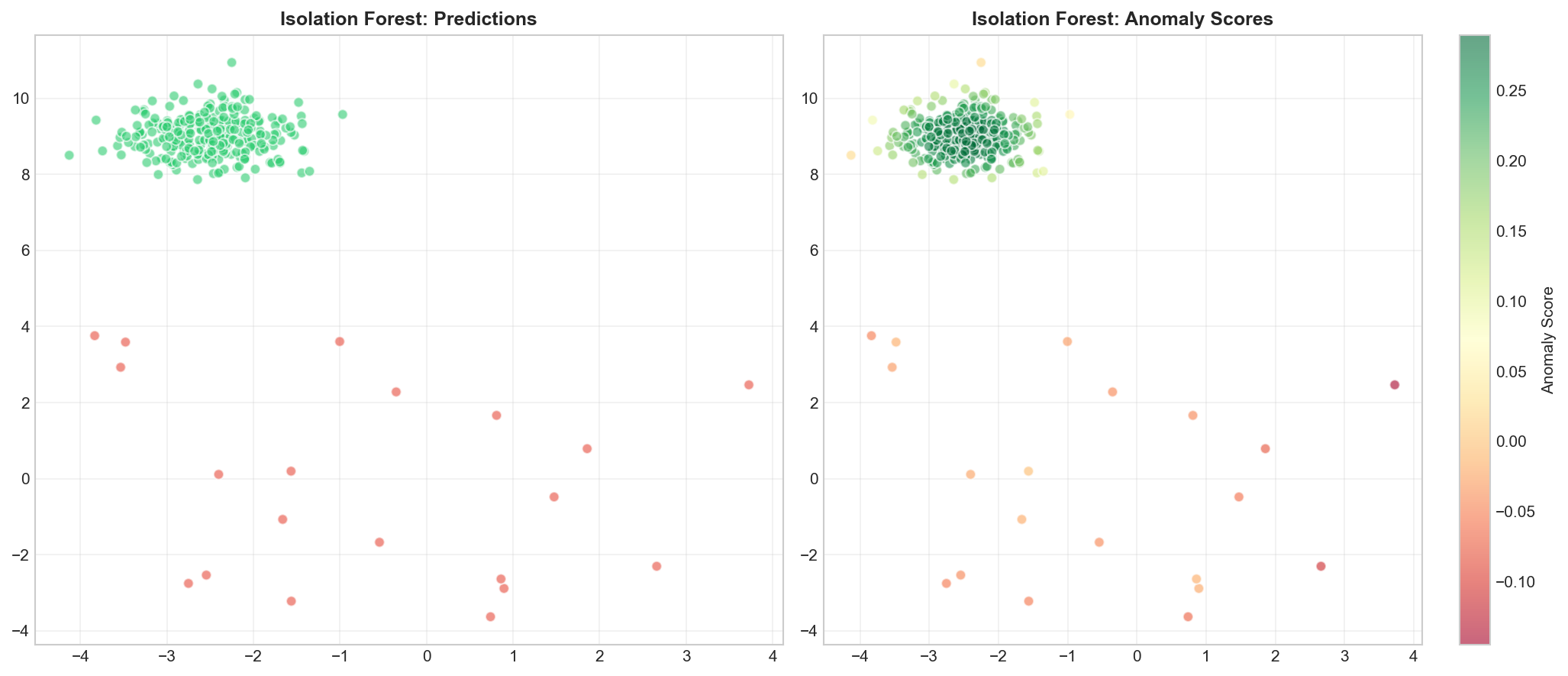
๐Ÿ“ˆ Score range: [-0.145, 0.290]

Visualizing Isolation Forest

๐Ÿ Python
 1
 2
 3
 4
 5
 6
 7
 8
 9
10
11
12
13
14
15
16
17
18
19
fig, axes = plt.subplots(1, 2, figsize=(14, 6))

# Predictions
colors = ['#2ecc71' if p == 1 else '#e74c3c' for p in predictions]
axes[0].scatter(X[:, 0], X[:, 1], c=colors, alpha=0.6, s=40, edgecolors='white')
axes[0].set_title('Isolation Forest: Predictions', fontsize=12, fontweight='bold')
axes[0].legend(['Normal', 'Anomaly'], loc='upper right')
axes[0].grid(True, alpha=0.3)

# Anomaly scores
scatter = axes[1].scatter(X[:, 0], X[:, 1], c=scores, cmap='RdYlGn', 
                          alpha=0.6, s=40, edgecolors='white')
plt.colorbar(scatter, ax=axes[1], label='Anomaly Score')
axes[1].set_title('Isolation Forest: Anomaly Scores', fontsize=12, fontweight='bold')
axes[1].grid(True, alpha=0.3)

plt.tight_layout()
plt.savefig('assets/isolation_forest.png', dpi=150)
plt.show()
Isolation Forest results
Left: detected anomalies (red). Right: anomaly scores (red = high, green = low)

Local Outlier Factor

๐Ÿ Python
 1
 2
 3
 4
 5
 6
 7
 8
 9
10
11
12
13
14
15
16
17
18
19
20
21
22
from sklearn.neighbors import LocalOutlierFactor

# Fit LOF
lof = LocalOutlierFactor(n_neighbors=20, contamination=0.06)
predictions_lof = lof.fit_predict(X)
lof_scores = lof.negative_outlier_factor_

print("=" * 50)
print("LOCAL OUTLIER FACTOR")
print("=" * 50)
print(f"\n๐Ÿ“Š Total points: {len(X)}")
print(f"โš ๏ธ Detected anomalies: {(predictions_lof == -1).sum()}")
print(f"๐Ÿ“ˆ LOF scores range: [{lof_scores.min():.3f}, {lof_scores.max():.3f}]")

# Visualize Results
plt.figure(figsize=(10, 6))
colors = ['#2ecc71' if p == 1 else '#e74c3c' for p in predictions_lof]
plt.scatter(X[:, 0], X[:, 1], c=colors, alpha=0.7, s=40, edgecolors='white')
plt.title(f'Local Outlier Factor: Detected {(predictions_lof == -1).sum()} Anomalies', fontsize=12, fontweight='bold')
plt.grid(True, alpha=0.3)
plt.savefig('assets/lof_concept.png', dpi=150)
plt.show()

Output:

1
2
3
4
5
6
7
==================================================
LOCAL OUTLIER FACTOR
==================================================

๐Ÿ“Š Total points: 320
โš ๏ธ Detected anomalies: 20
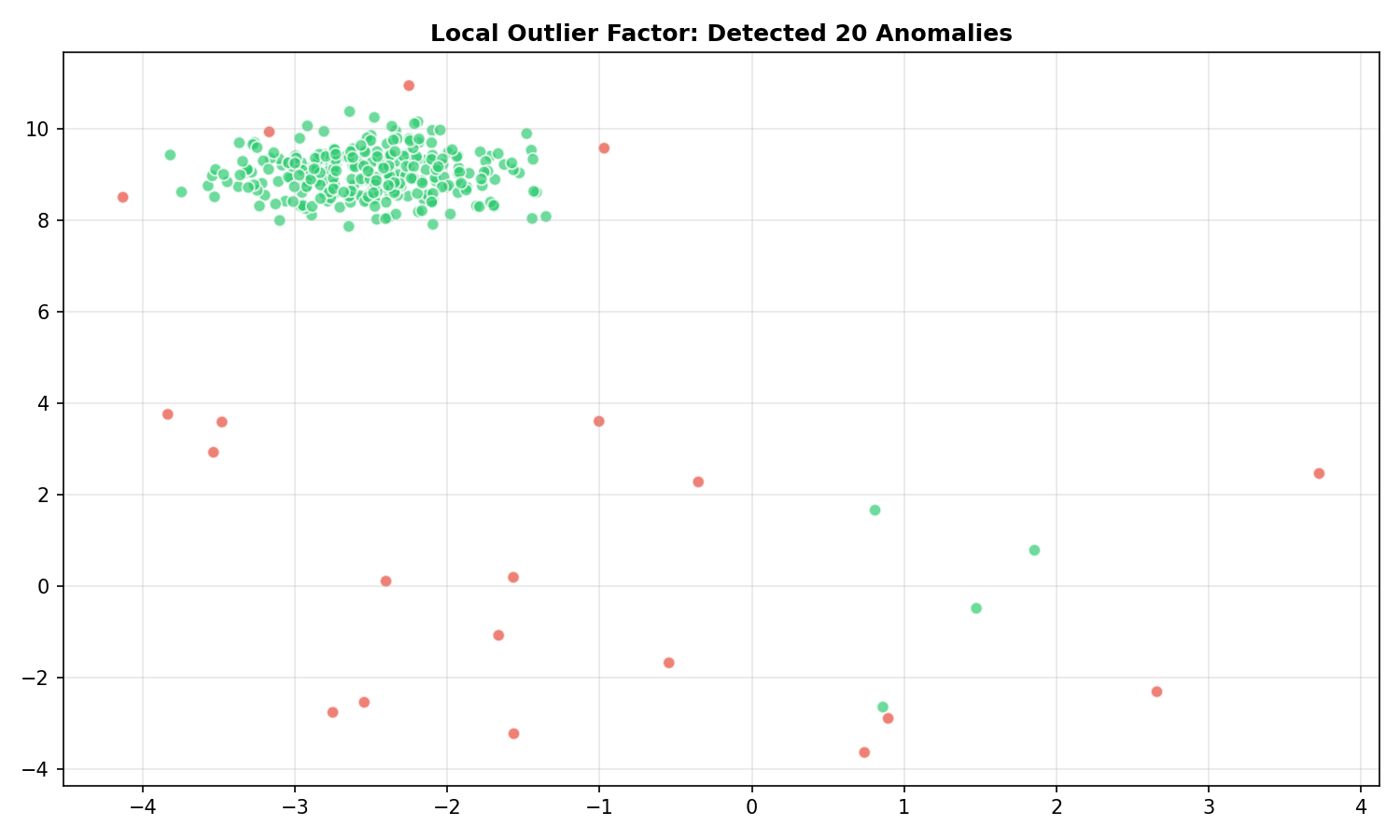
๐Ÿ“ˆ LOF scores range: [-8.501, -0.959]
LOF results
LOF detects anomalies based on local density comparison

Comparing Methods

๐Ÿ Python
 1
 2
 3
 4
 5
 6
 7
 8
 9
10
11
12
13
14
15
16
17
18
19
20
21
22
23
24
fig, axes = plt.subplots(1, 3, figsize=(15, 5))

# Isolation Forest
axes[0].scatter(X[:, 0], X[:, 1], c=['#2ecc71' if p == 1 else '#e74c3c' for p in predictions],
                alpha=0.6, s=40, edgecolors='white')
axes[0].set_title(f'Isolation Forest\n({(predictions == -1).sum()} anomalies)', fontsize=11, fontweight='bold')
axes[0].grid(True, alpha=0.3)

# LOF
axes[1].scatter(X[:, 0], X[:, 1], c=['#2ecc71' if p == 1 else '#e74c3c' for p in predictions_lof],
                alpha=0.6, s=40, edgecolors='white')
axes[1].set_title(f'Local Outlier Factor\n({(predictions_lof == -1).sum()} anomalies)', fontsize=11, fontweight='bold')
axes[1].grid(True, alpha=0.3)

# Ground truth
true_labels = np.concatenate([np.ones(300), -np.ones(20)])
axes[2].scatter(X[:, 0], X[:, 1], c=['#2ecc71' if p == 1 else '#e74c3c' for p in true_labels],
                alpha=0.6, s=40, edgecolors='white')
axes[2].set_title('Ground Truth\n(20 anomalies)', fontsize=11, fontweight='bold')
axes[2].grid(True, alpha=0.3)

plt.tight_layout()
plt.savefig('assets/method_comparison.png', dpi=150)
plt.show()
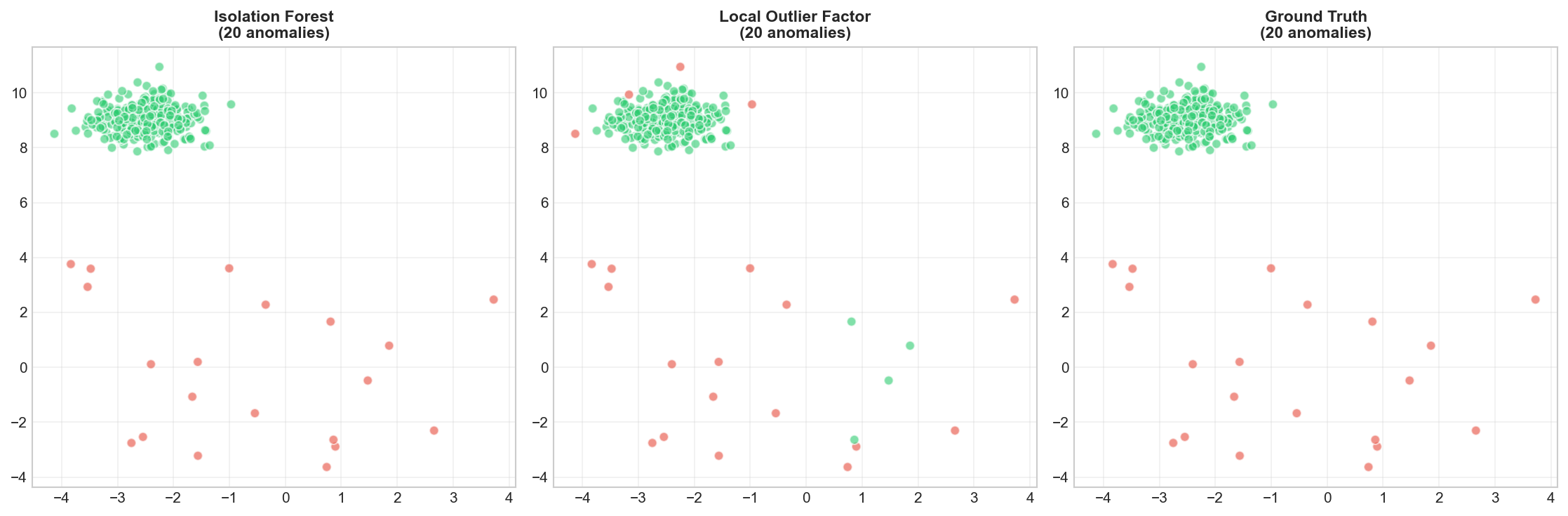
Comparison of anomaly methods
Both methods correctly identify most outliers

Deep Dive

Choosing the Right Method

MethodBest ForLimitations
Z-score/IQRUnivariate, Gaussian dataAssumes distribution
Isolation ForestHigh-dimensional, fastGlobal outliers
LOFLocal outliers, varied densitiesSlower, needs k choice
One-Class SVMComplex boundariesScaling, parameters

Handling Contamination Rate

The contamination parameter is crucial but often unknown:

  • If known: set explicitly (e.g., 5% fraud rate)
  • If unknown: try multiple values, use domain knowledge
  • Alternative: use auto and threshold scores manually

Frequently Asked Questions

Q1: How do I evaluate anomaly detection without labels?

Difficult! Options:

  • Manual inspection of flagged anomalies
  • Domain expert validation
  • If partial labels exist: precision/recall on known anomalies

Q2: What if I have labeled anomalies?

Then you have a supervised classification problem! Consider:

  • One-Class SVM (trained on normals only)
  • Supervised classifiers with class imbalance handling

Q3: How do I handle high-dimensional data?

  • Use Isolation Forest (handles high-D well)
  • Apply PCA first, then anomaly detection
  • Use distance metrics designed for high-D (e.g., cosine)

Summary

ConceptKey Points
AnomalyUnusual observation, differs from majority
Isolation ForestTree-based, isolates anomalies quickly
LOFDensity-based, compares to local neighborhood
ContaminationExpected proportion of anomalies
EvaluationDifficult without labels; use domain knowledge

References

  • Liu, F.T. et al. (2008). “Isolation Forest”
  • Breunig, M.M. et al. (2000). “LOF: Identifying Density-Based Local Outliers”
  • sklearn Outlier Detection