Compare workflow, usability, and accuracy of three major CFD platforms—COMSOL Multiphysics, ANSYS Fluent, and OpenFOAM—using the classic 2D cylinder flow benchmark case. From vortex shedding patterns to drag coefficients, explore how different tools tackle the same fundamental fluid dynamics problem.
Introduction
Flow around a circular cylinder is perhaps the most celebrated benchmark problem in computational fluid dynamics. Why? Because this deceptively simple geometry produces remarkably complex and beautiful physics—from steady symmetric wakes at low Reynolds numbers to the mesmerizing von Kármán vortex street that forms as flow speeds increase.
This problem has been studied experimentally for over a century, providing reliable data for simulation validation. The periodic vortex shedding, characterized by the Strouhal number, and the resulting forces on the cylinder (drag and lift coefficients) provide clear, quantitative metrics for comparison.
This article tackles this classic problem using three of the most widely used CFD platforms:
Aspect
COMSOL
Fluent
OpenFOAM
License
Commercial
Commercial
Open-source
Interface
GUI + MATLAB/Java API
GUI + TUI + UDF
Command-line + scripts
Learning curve
Moderate
Moderate
Steep
Meshing
Built-in, parametric
Professional (ANSYS Meshing)
snappyHexMesh, blockMesh
Scripting
MATLAB LiveLink
Fluent TUI, Python
Native C++, Python
Parallelization
Automatic
Automatic
MPI-based, manual setup
The goal is not to crown a “winner”—each tool has its place. Instead, this comparison explores how each platform approaches the same problem, examining workflow, usability, and simulation accuracy.
Problem Definition
Physical Background
When fluid flows around a bluff body like a cylinder, the boundary layer separates from the surface, creating a wake region behind the cylinder. At sufficiently high Reynolds numbers, this wake becomes unstable and vortices are shed alternately from each side—the famous von Kármán vortex street.
The Reynolds number, which governs the flow regime, is defined as:
$$Re = \frac{U_\infty D}{\nu}$$
where:
$U_\infty$ is the freestream velocity
$D$ is the cylinder diameter
$\nu$ is the kinematic viscosity
Reynolds Number
Flow Regime
Characteristics
Re < 5
Creeping flow
Symmetric, no separation
5 < Re < 40
Steady separation
Symmetric recirculation bubble
40 < Re < 150
Laminar vortex shedding
Periodic von Kármán street
150 < Re < 300
Transition
3D instabilities emerge
Re > 300
Turbulent wake
Complex, irregular shedding
Benchmark Case Parameters
For this comparison, a 2D laminar flow at Re = 100 serves as the test case—a classic regime that produces periodic, well-defined vortex shedding while remaining computationally tractable.
Parameter
Symbol
Value
Description
Cylinder diameter
$D$
0.1 m
Reference length
Freestream velocity
$U_\infty$
1.0 m/s
Inlet velocity
Kinematic viscosity
$\nu$
1.0 × 10⁻³ m²/s
Calculated from Re
Density
$\rho$
1.0 kg/m³
Simplified fluid
Reynolds number
Re
100
Laminar vortex shedding
Note: A simplified fluid with ρ = 1 kg/m³ is used, with viscosity calculated from the target Reynolds number. This is a common approach in CFD benchmarking that eliminates material property uncertainties.
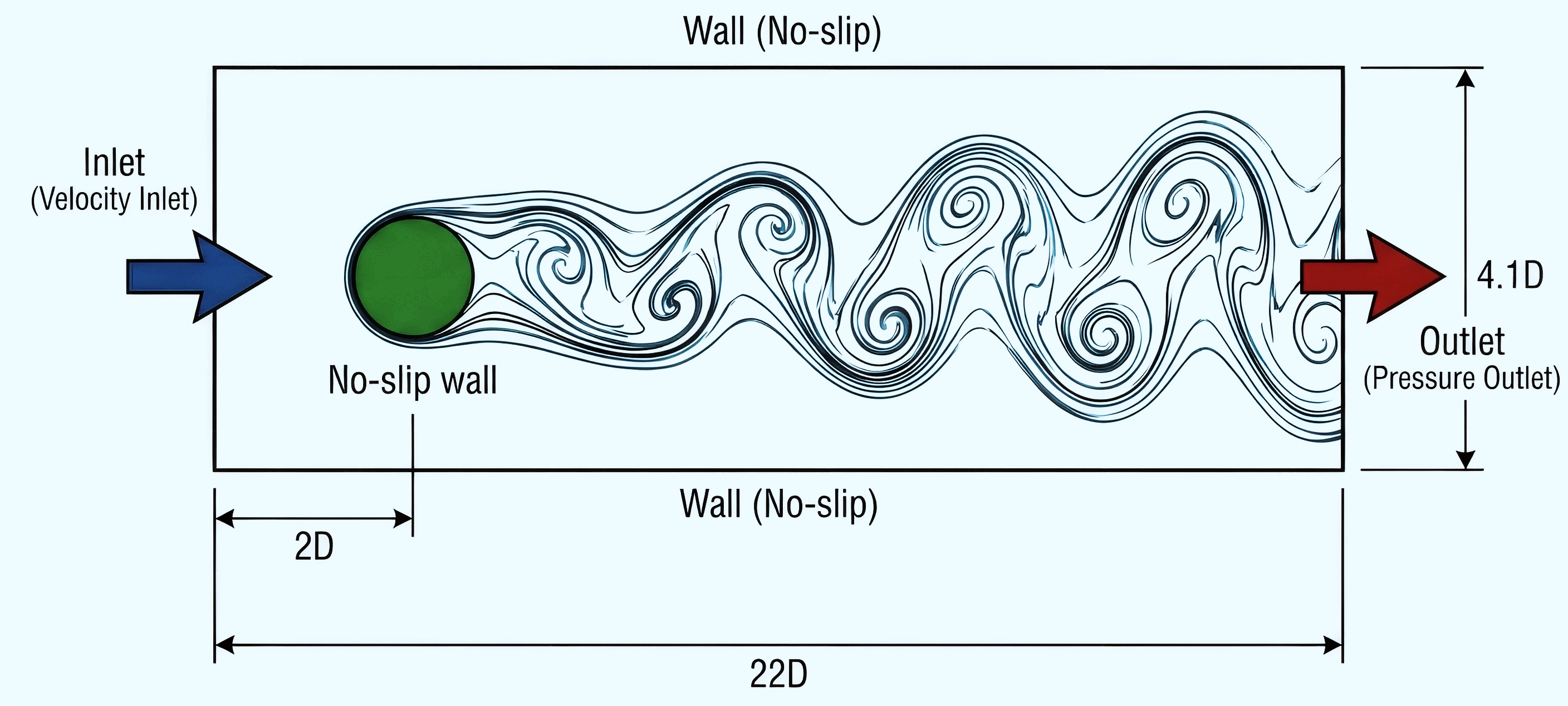
Computational Domain
The domain size significantly affects solution accuracy. A domain that’s too small can artificially constrain the wake development.
Computational domain with dimensions in terms of cylinder diameter D
Parameter
Value
Rationale
Channel length
22D (2.2 m)
Extended domain for wake development
Channel height
4.1D (0.41 m)
Asymmetric height for vortex trigger
Upstream length
2D
Cylinder at (2D, 2D) from inlet
Downstream length
20D
Capture vortex shedding pattern
Cylinder position
(2D, 2D) from bottom-left
Asymmetric to trigger vortex shedding
Why 4.1D instead of 4D? The domain uses H = 0.41 m with the cylinder centered at y = 0.2 m, creating a slight vertical asymmetry (0.20 m to bottom vs 0.21 m to top). This geometric asymmetry naturally triggers vortex shedding without requiring artificial perturbations, ensuring reproducible results across different solvers.
Governing Equations
The incompressible Navier-Stokes equations govern the flow:
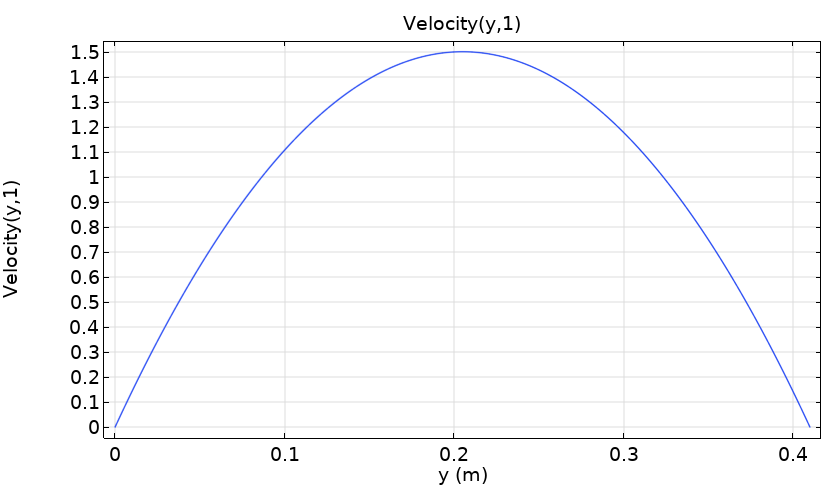
Why a parabolic inlet profile? A fully-developed parabolic (Poiseuille) velocity profile is used at the inlet. The factor of 6 ensures the mean velocity equals $U_m$, while the maximum velocity at the channel center is $1.5 U_m$. This profile represents physically realistic channel flow.Parabolic velocity profile
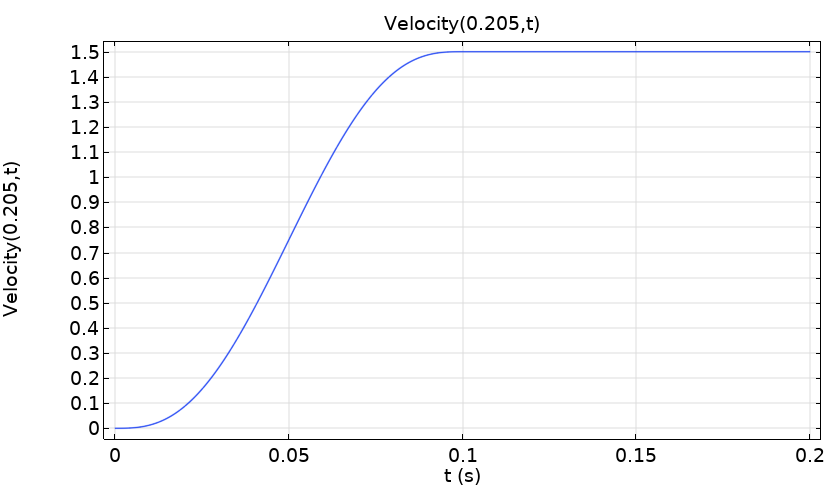
Time ramp-up: In transient simulations, the inlet velocity is multiplied by a smooth step function that ramps from 0 to 1 over the first ~0.1 seconds. This prevents numerical instabilities from an impulsive start and allows the solver to gradually establish the flow field.Time ramp-up profile
Key Performance Metrics
To compare simulation results quantitatively, three well-established metrics are examined:
Metric
Definition
Unbounded Flow (Re=100)
Confined Channel
Drag coefficient $C_D$
$\dfrac{2F_D}{\rho U_m^2 D}$
1.33 ± 0.05
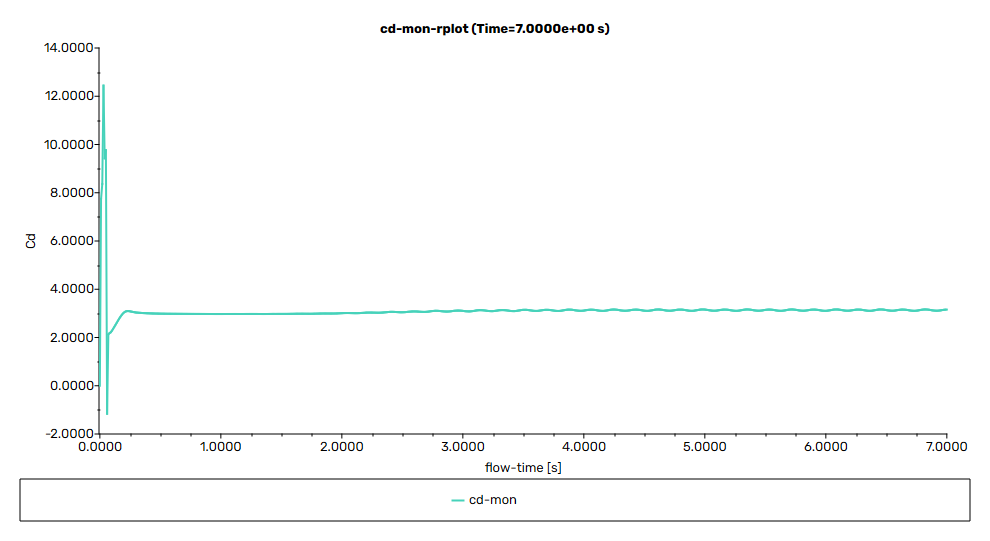
~3.2
Lift coefficient $C_L$
$\dfrac{2F_L}{\rho U_m^2 D}$
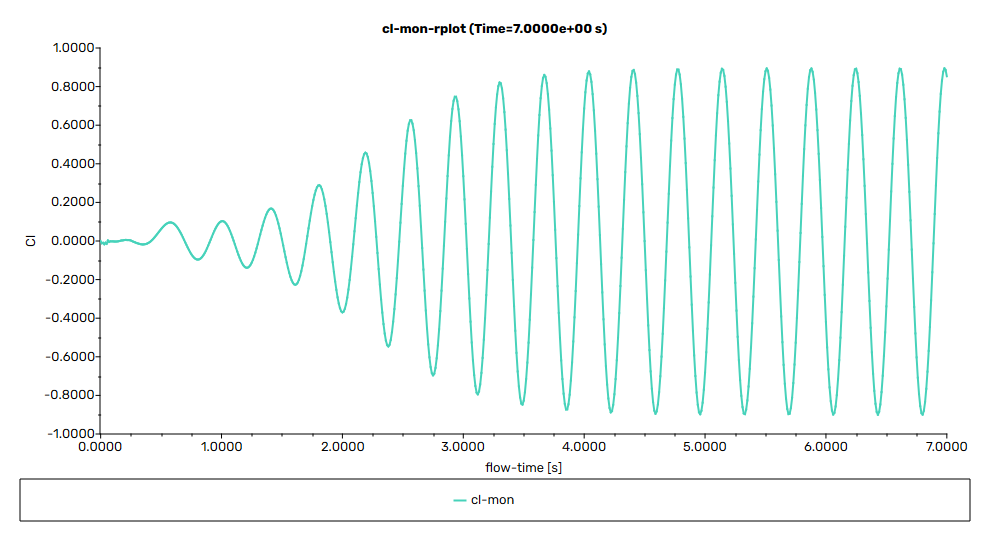
±0.3 (amplitude)
±0.9
Strouhal number St
$\dfrac{fD}{U_m}$
0.164 ± 0.005
~0.29
Why do confined channel values differ? The narrow channel (H = 4.1D) significantly affects the flow. The walls accelerate the fluid around the cylinder (blockage effect), increasing both the effective Reynolds number and forces on the cylinder. The shedding frequency also increases due to the constrained geometry.
COMSOL Multiphysics
Workflow Overview
COMSOL’s physics-first approach makes it intuitive for users familiar with the underlying equations. The workflow follows a logical progression from geometry to results.
flowchart LR
    A[Build\n Geometry] --> B[Define\n Materials]
    B --> C[Add Physics:\n Laminar Flow]
    C --> D[Set Boundary\n Conditions]
    D --> E[Generate\n Mesh]
    E --> F[Configure\n Solver]
    F --> G[Run\n Simulation]
    G --> H[Post-process\n Results]
Geometry Setup
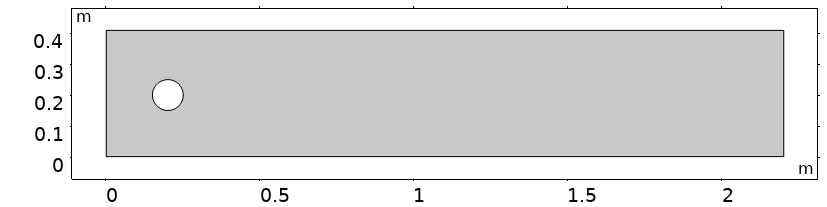
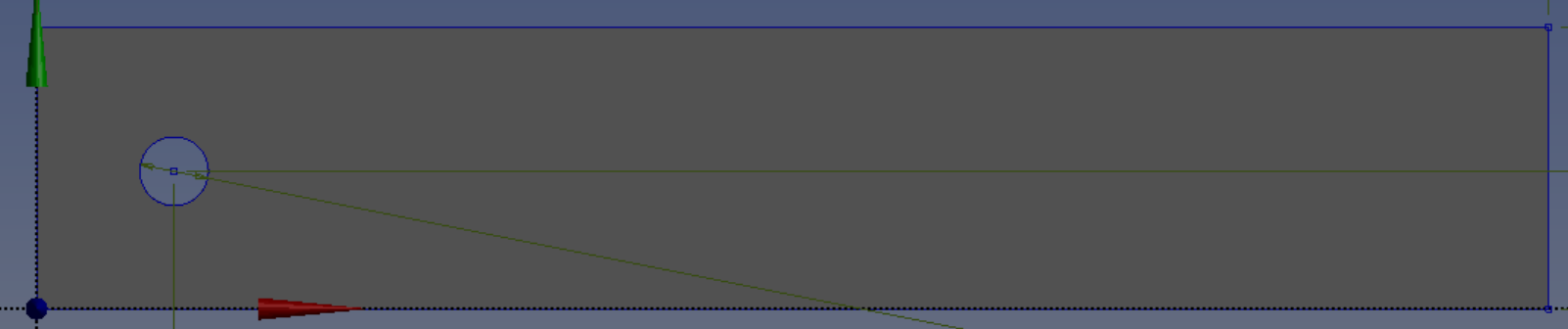
In COMSOL, the 2D geometry consists of:
A rectangular channel domain
A circular cutout for the cylinder
Asymmetric cylinder placement to trigger vortex shedding
COMSOL geometry
Physics Configuration
COMSOL uses the Laminar Flow (spf) physics interface:
Setting
Configuration
Rationale
Physics interface
Single-Phase Laminar Flow
No multiphase or turbulence modeling needed
Compressibility
Incompressible
Low Mach number flow (Ma ≪ 0.3)
Turbulence
None (laminar)
Re = 100 is well within laminar regime
Reference pressure
0 Pa
Gauge pressure; absolute value not important
Boundary Conditions in COMSOL
Boundary
COMSOL Feature
Settings
Inlet
Velocity inlet
Parabolic profile with time ramp-up
Outlet
Pressure outlet
p = 0 Pa (zero gauge pressure)
Top/Bottom
Wall (no-slip)
Channel walls
Cylinder
Wall (no-slip)
Default no-slip condition
What is no-slip? The no-slip condition means fluid velocity at a solid surface equals the wall velocity ($\mathbf{u} = 0$ for stationary walls). This physically realistic condition arises from molecular adhesion between fluid and surface, creating the velocity gradients that produce viscous drag.
Mesh Strategy
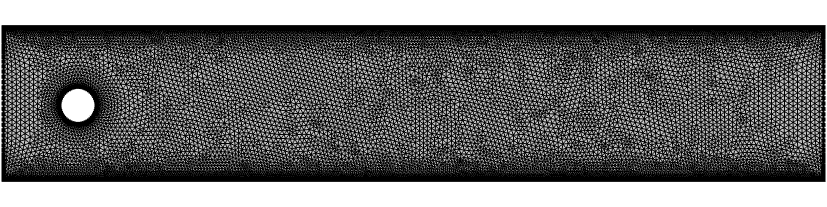
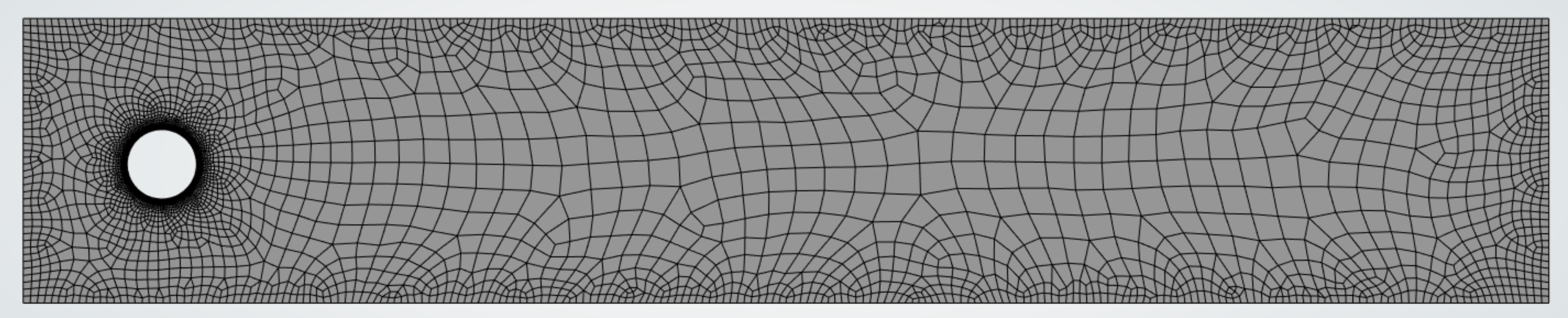
COMSOL’s physics-controlled meshing with manual refinement near the cylinder:
Free triangular mesh for the domain
Boundary layers on the cylinder surface (8 layers)
Size function: Finer near cylinder, coarser in far field
Maximum element size: 0.1D near cylinder, 0.5D in far field
COMSOL mesh
Solver Settings
For time-dependent simulation:
Parameter
Value
Study type
Time Dependent
Time range
0 to 7 s (coarse → fine stepping)
Time step
0.2 s (t<3.4s), 0.02 s (t>3.5s)
Solver
PARDISO (direct) or GMRES (iterative)
COMSOL Results
COMSOL provides four main result visualizations configured in the model:
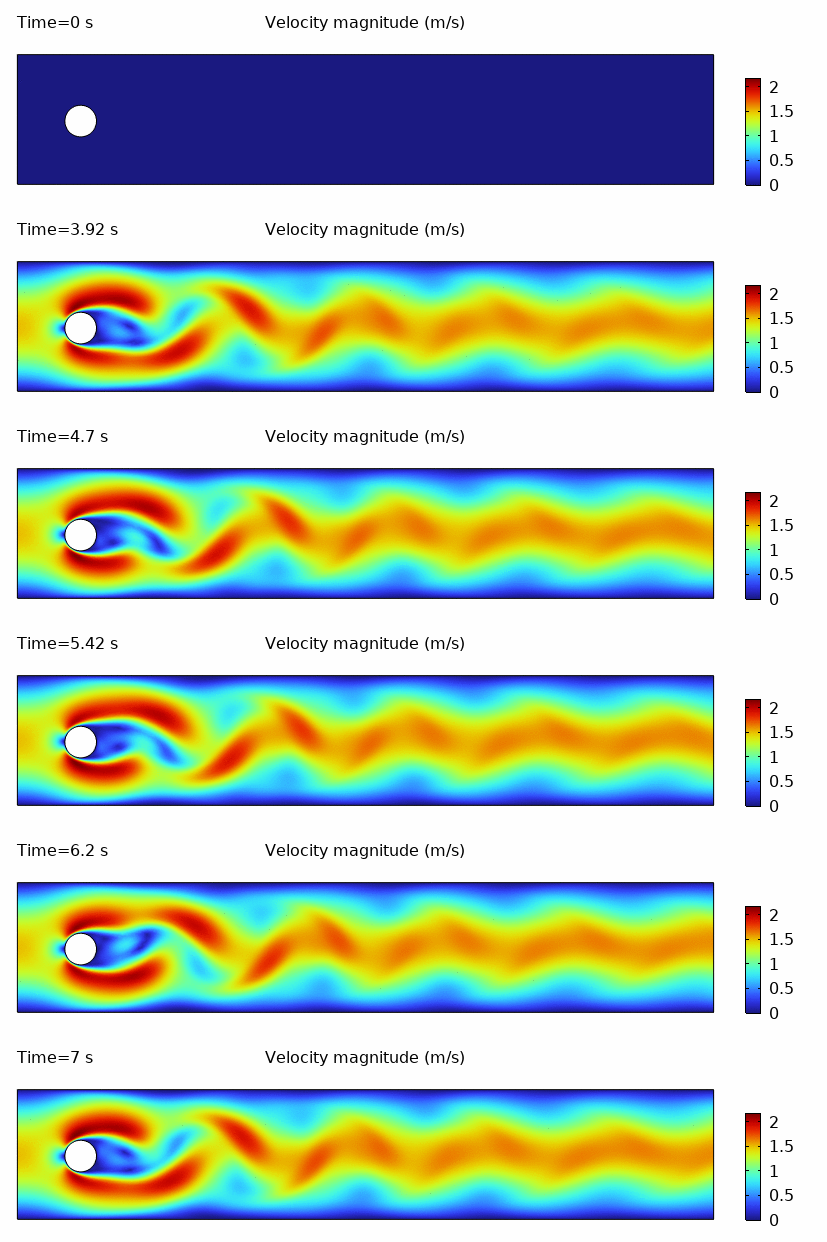
Velocity Field (spf)
The velocity magnitude field shows the development of the von Kármán vortex street behind the cylinder. The animation captures the periodic shedding of alternating vortices.
Velocity magnitude showing von Kármán vortex street development
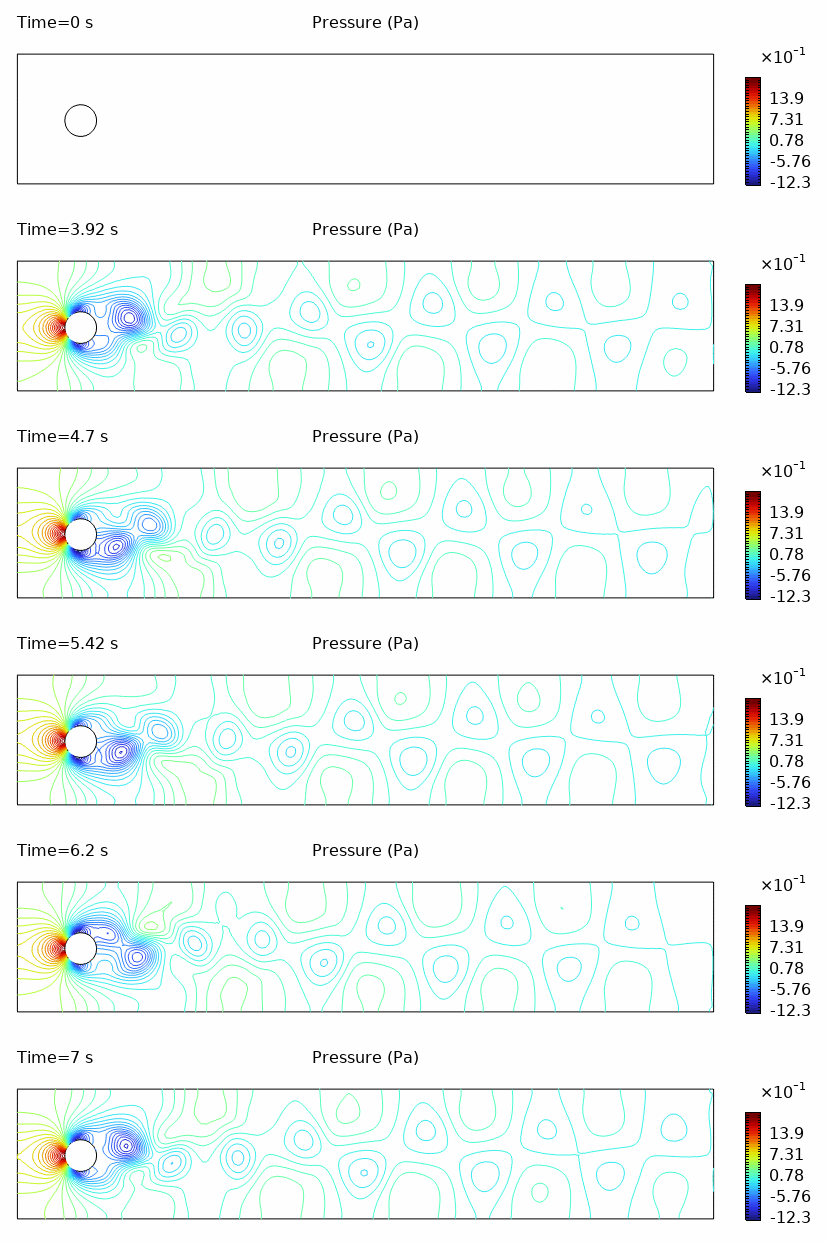
Pressure Field (spf)
The pressure contours reveal the alternating high and low pressure regions associated with vortex shedding. Note the pressure difference between the front (stagnation) and rear (wake) of the cylinder.
Pressure contour evolution during vortex shedding
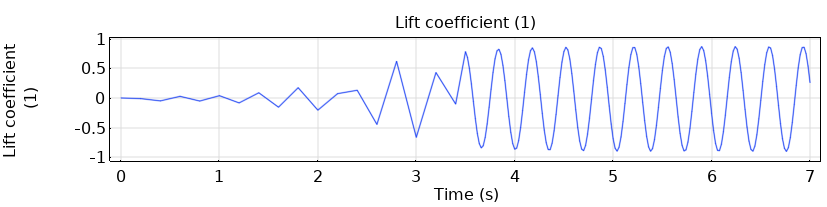
Lift Coefficient
The lift coefficient oscillates periodically once vortex shedding is established. COMSOL calculates it using the expression C_L = -2 × reacf(v) × W / (ρ × U_mean² × D × W), where reacf(v) is the y-component of the reaction force on the cylinder surface.
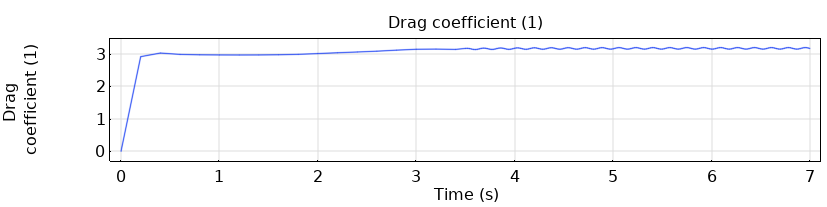
The drag coefficient shows a mean value with small oscillations at twice the shedding frequency. The expression C_D = -2 × reacf(u) × W / (ρ × U_mean² × D × W) uses reacf(u), the x-component of the reaction force.
Drag coefficient evolution over simulation time
Strouhal Number Calculation
The Strouhal number is extracted from the lift coefficient oscillation frequency by measuring the period between peaks:
Note: The Strouhal number (St ≈ 0.29) is higher than the classical unbounded flow value (St ≈ 0.164) due to the narrow channel geometry. The channel walls (H = 4.1D) accelerate the flow around the cylinder, increasing the effective velocity and shedding frequency compared to an infinite domain.
ANSYS Fluent
Workflow Overview
Fluent uses multiple integrated tools within the ANSYS Workbench environment:
flowchart LR
    A[DesignModeler\n Geometry] --> B[ANSYS\n Meshing]
    B --> C[Fluent\n Setup]
    C --> D[Fluent\n Solution]
    D --> E[Post-Processing]
Key Setup Summary
Geometry (DesignModeler)
Create a 2D Surface Body (critical for 2D CFD) with:
Rectangular domain: 2.2 m × 0.41 m
Circular cutout: D = 0.1 m at (0.2, 0.2) m — note the asymmetric placement to trigger vortex shedding
Geometry setup in ANSYS DesignModeler
Mesh (ANSYS Meshing)
Feature
Configuration
Purpose
Cylinder sizing
0.002 m
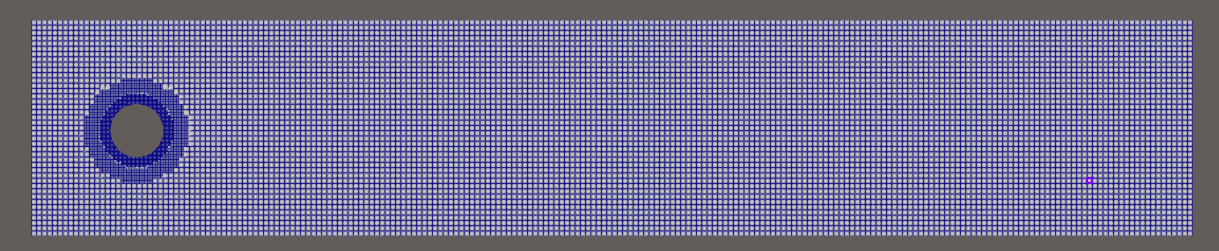
~150 cells around cylinder
Inflation
15 layers, 0.01 m
Boundary layer resolution
Named Selections
inlet, outlet, walls, cylinder
BC assignment in Fluent
Mesh with inflation layers around the cylinder
Physics (Fluent 24R2)
Setting
Value
Solver
Pressure-Based, Transient
Viscous Model
Laminar
Density
1.0 kg/m³
Viscosity
0.001 kg/(m·s)
Inlet Boundary (Parabolic Profile)
Fluent supports custom velocity profiles via Expressions:
// system/controlDict - forceCoeffs function
forceCoeffs{typeforceCoeffs;libs(forces);patches(cylinder);rhoInf1.0;magUInf1.0;lRef0.1;// Cylinder diameter
Aref0.001;// D × depth for 2D
liftDir(010);dragDir(100);CofR(0.20.20);}
⚠️ Critical: For 2D simulations, Aref = D × mesh_depth = 0.1 × 0.01 = 0.001 m². Using incorrect Aref produces wrong coefficient values.

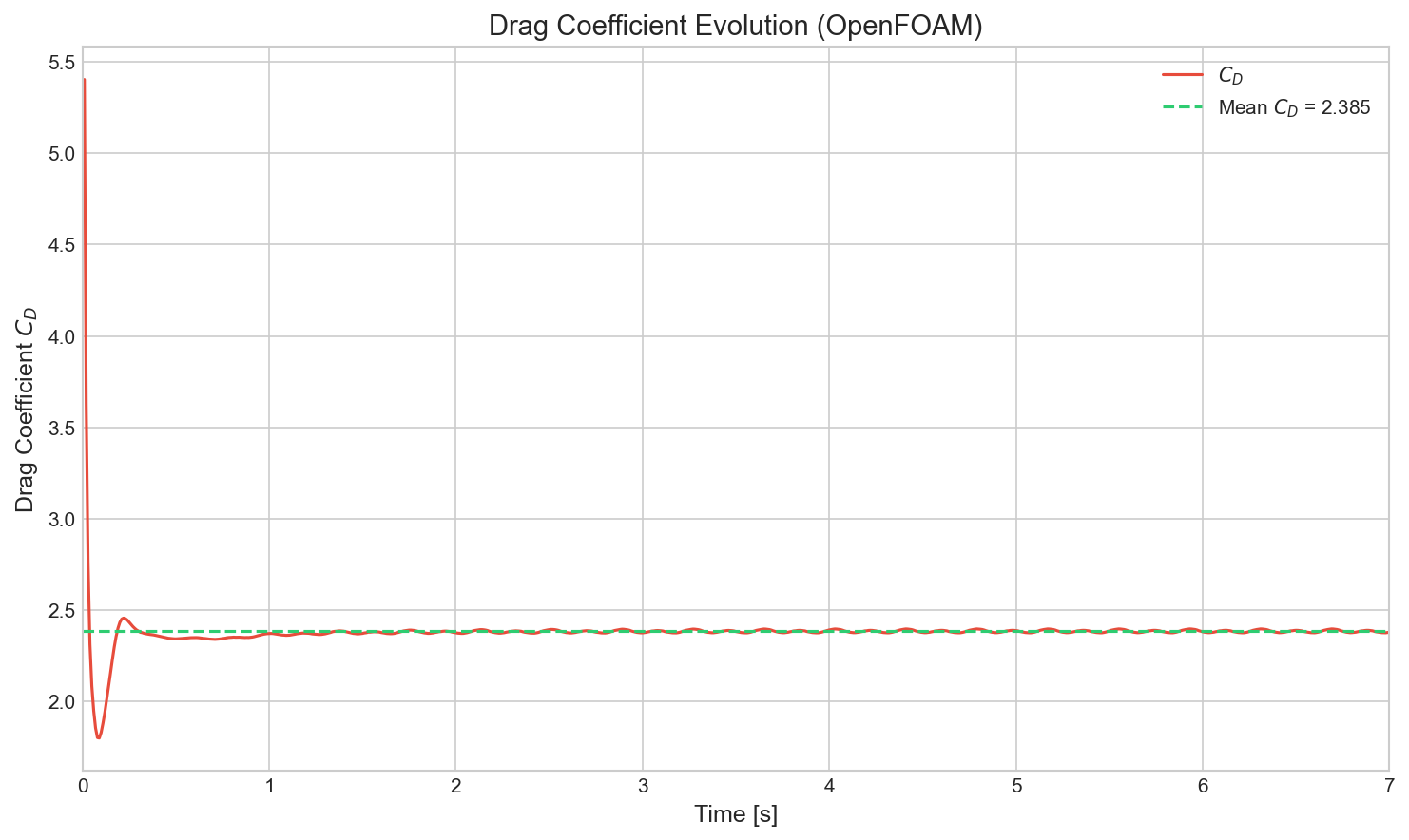
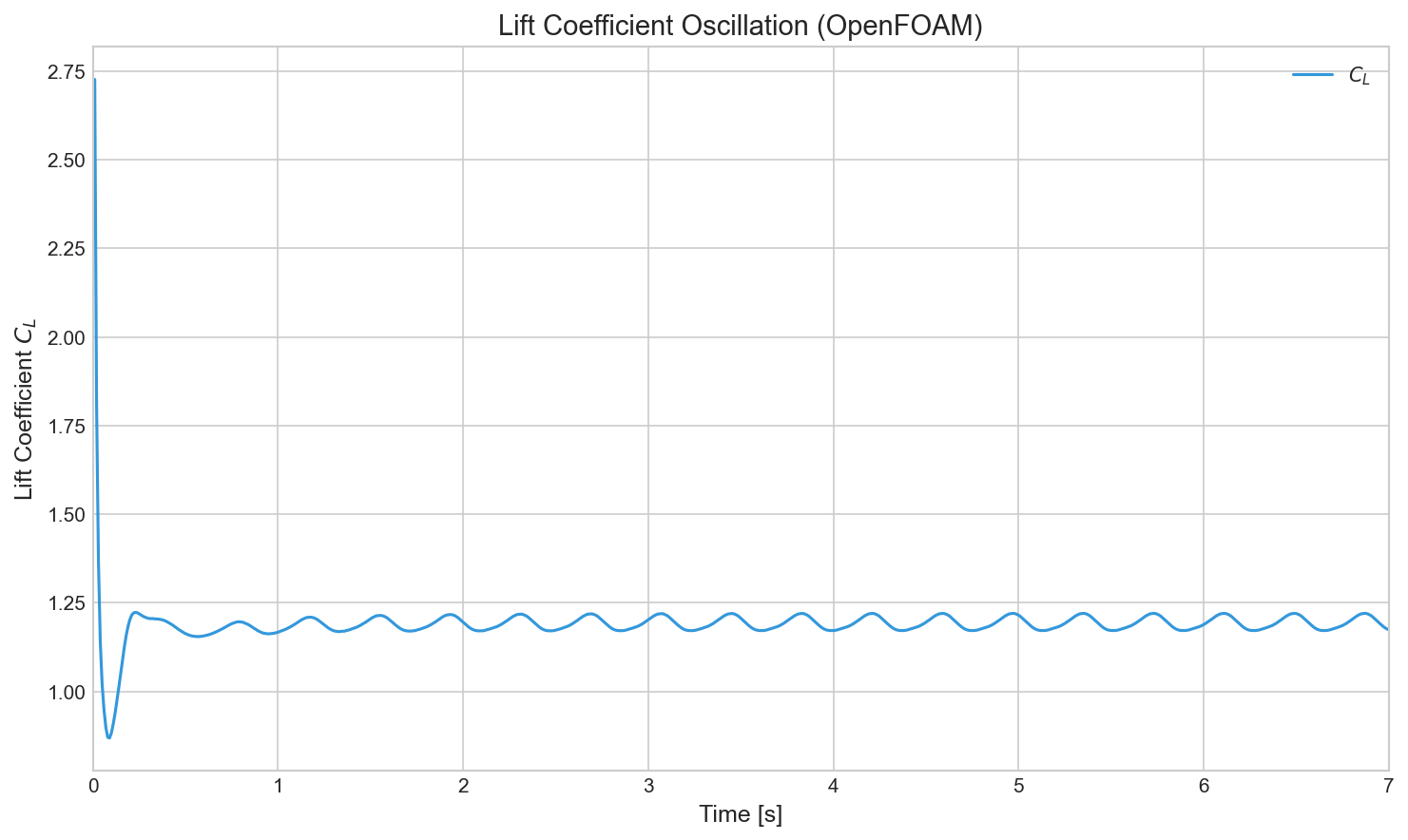
Velocity magnitude showing von Kármán vortex street (OpenFOAM)Drag coefficient evolution (OpenFOAM)Lift coefficient oscillation (OpenFOAM)
Quantitative Results
Metric
OpenFOAM
COMSOL
Notes
Strouhal number
0.275
0.29
5% difference
Mean C_D
2.39
~3.2
Lower due to uniform inlet
C_L amplitude
±0.024
±0.9
Sampling frequency effect
Why differences? OpenFOAM uses uniform inlet velocity while COMSOL uses parabolic profile. The parabolic profile produces higher velocities at the cylinder height, resulting in stronger vortex shedding and larger force oscillations.
Results Comparison
All three solvers successfully capture the physical phenomena expected at Re = 100:
Von Kármán Vortex Street: A stable, periodic shedding of vortices in the wake.
Initial Transient: A development phase lasting 2-3 seconds before the periodic regime is established.
Oscillatory Forces: Periodic drag and lift forces, with the lift coefficient oscillating at the shedding frequency and drag at twice that frequency.
Differences in absolute numerical values (e.g., peak lift coefficients) include:
Inlet Profiles: Parabolic (COMSOL) vs. Uniform (OpenFOAM). Parabolic profiles typically result in stronger shedding due to higher centerline velocity.
Mesh Topology: Unstructured triangular (COMSOL/Fluent) vs. Structured/Hex-dominant (OpenFOAM).
Time Stepping: Adaptive (COMSOL) vs. Fixed (OpenFOAM).
Despite these configuration differences, the Strouhal number—the dimensionless frequency of vortex shedding—remains consistent across all platforms ($\text{St} \approx 0.28 - 0.29$), confirming the physical validity of each simulation.
Discussion: Workflow & Philosophy
Simulating flow around a cylinder reveals less about the physics—which is constant—and more about the philosophy of each tool. While all three platforms captured the von Kármán vortex street with reasonable accuracy (St ≈ 0.28-0.29), the journey to get there differed significantly.
Workflow Comparison
Aspect
COMSOL
Fluent
OpenFOAM
Setup time
Short (GUI)
Medium (multiple tools)
Long (scripting)
Learning curve
Gentle
Moderate
Steep
Debugging
Visual feedback
GUI + TUI
Text-based logs
Reproducibility
MATLAB scripts
Journal files
Case directories
Customization
Limited
UDFs
Full source access
Conclusion: Choosing the Right Tool
COMSOL Multiphysics is the Architect’s Choice. Its unified, equation-based interface allowed us to set up the simulation in minutes. It shines when multiphysics coupling is needed.
ANSYS Fluent is the Engineer’s Workhorse. It offers a balanced ecosystem with powerful meshing tools and robust solvers. It handles complex industrial geometries with ease.
OpenFOAM is the Researcher’s Scalpel. It demands a steep learning curve but offers unmatched transparency. It is the only choice when you need complete control over every term in the governing equations.
Final Verdict
If you need…
Choose…
Speed & Multiphysics
COMSOL (Best for feasibility studies & academic coupled problems)
Industrial Validation
Fluent (Best for standard engineering workflows & complex assemblies)
Control & Scale
OpenFOAM (Best for custom physics, HPC scaling & budget-constrained projects)
References
Williamson, C. H. K. (1996). “Vortex dynamics in the cylinder wake.” Annual Review of Fluid Mechanics, 28, 477-539.
Schäfer, M., Turek, S., et al. (1996). “Benchmark Computations of Laminar Flow Around a Cylinder.” Notes on Numerical Fluid Mechanics, 52, 547-566.
Braza, M., Chassaing, P., & Minh, H. H. (1986). “Numerical study and physical analysis of the pressure and velocity fields in the near wake of a circular cylinder.” Journal of Fluid Mechanics, 165, 79-130.