Focused Ultrasound Heating: Multi-physics Simulation
Introduction
High-Intensity Focused Ultrasound (HIFU) is a non-invasive therapeutic technique that uses acoustic energy to heat and ablate tissue. By focusing ultrasound waves to a small focal region, temperatures can rise rapidly above 60°C, causing coagulative necrosis—a form of controlled tissue destruction used in oncology, neurosurgery, and cosmetic treatments.
This post demonstrates a multi-physics simulation of focused ultrasound heating—combining acoustic wave propagation with bio-heat transfer and thermal dose calculation. The simulation is implemented using two complementary tools:
- k-Wave: An open-source MATLAB toolbox using the k-space pseudospectral method
- COMSOL Multiphysics: A commercial finite element software with multi-physics coupling
Theoretical Background
The Bio-Heat Equation
Tissue heating from ultrasound absorption is governed by the Pennes bio-heat equation:
$$\rho C_p \frac{\partial T}{\partial t} = \nabla \cdot (k \nabla T) + Q$$
where:
- $T$ is the temperature [°C or K]
- $\rho$ is the tissue density [kg/m³]
- $C_p$ is the specific heat capacity [J/(kg·K)]
- $k$ is the thermal conductivity [W/(m·K)]
- $Q$ is the volumetric heat source [W/m³]
In this simulation, we neglect blood perfusion and metabolic heat generation for simplicity.
Acoustic Heat Deposition
The volumetric heat source from acoustic absorption is:
$$Q = \frac{2 \alpha |p|^2}{\rho_0 c_0}$$
where:
- $\alpha$ is the acoustic absorption coefficient [Np/m]
- $p$ is the acoustic pressure amplitude [Pa]
- $\rho_0$ is the tissue density [kg/m³]
- $c_0$ is the sound speed [m/s]
Power Law Absorption
Acoustic absorption in biological tissue follows a power law:
$$\alpha = \alpha_0 f^y$$
where:
- $\alpha_0$ is the frequency-independent absorption coefficient [dB/(MHz^y·cm)]
- $f$ is the frequency [MHz]
- $y$ is the power law exponent (typically 1.0–1.5 for tissue)
Thermal Dose (CEM43)
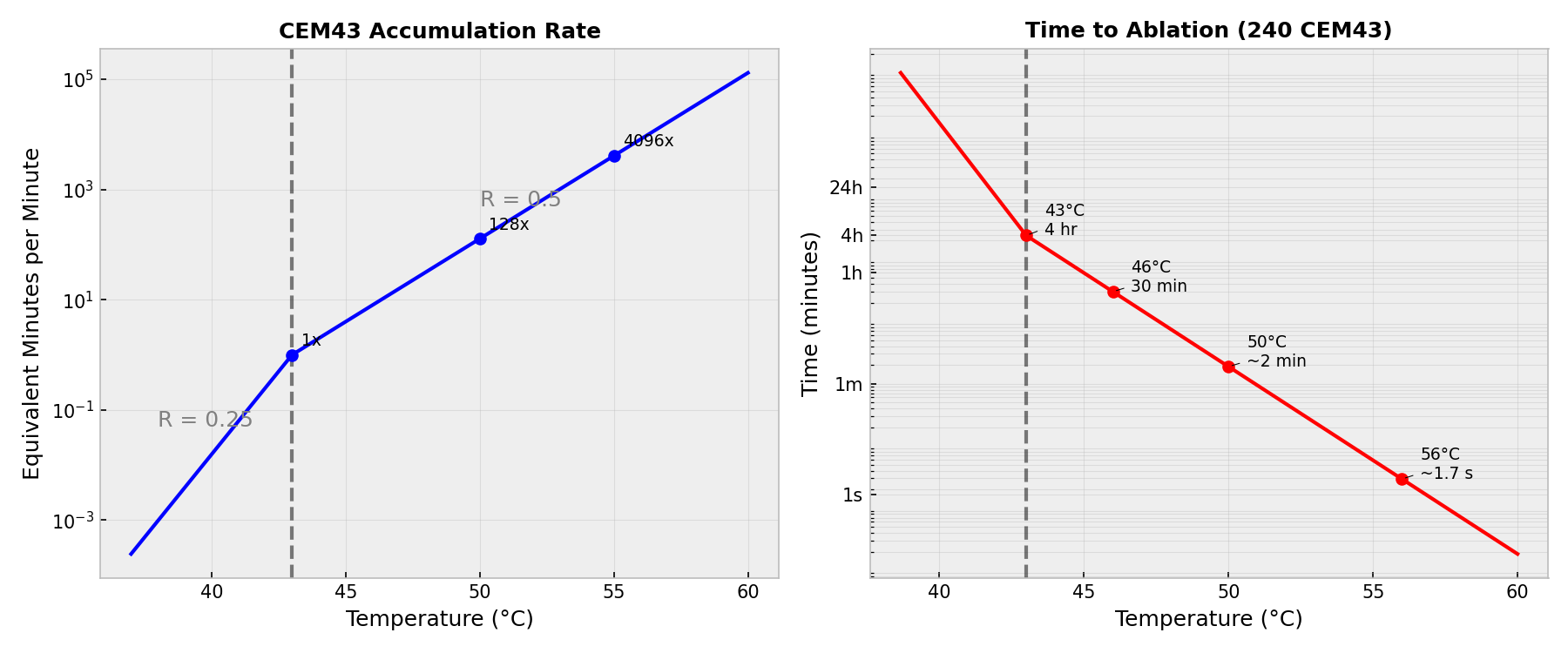
Thermal damage is quantified using the Cumulative Equivalent Minutes at 43°C (CEM43):
$$\text{CEM43} = \int_0^{t} R^{43 - T(\tau)} d\tau$$
where:
- $R = 0.5$ for $T \geq 43$°C
- $R = 0.25$ for $T < 43$°C
A CEM43 threshold of 240 minutes is commonly used to define the ablation zone (irreversible tissue damage).
The relationship between temperature and CEM43 accumulation is highly non-linear. The following plot visualizes the accumulation rate and the time required to reach the ablation threshold:
Problem Setup
The simulation models a focused ultrasound transducer heating tissue, with parameters matching the k-Wave example:
Acoustic Parameters
| Parameter | Value |
|---|---|
| Domain size | 54 × 54 mm |
| Grid points | 216 × 216 |
| Grid spacing | 0.25 mm |
| Frequency | 1 MHz |
| Source amplitude | 0.5 MPa |
| Sound speed | 1510 m/s |
| Density | 1020 kg/m³ |
| Absorption coefficient | 0.75 dB/(MHz^1.5·cm) |
| Absorption power | 1.5 |
Transducer Geometry
| Parameter | Value |
|---|---|
| Transducer diameter | 45 mm |
| Focal radius (curvature) | 35 mm |
| Focal point | 35 mm from transducer |
The focused transducer is modeled as a curved arc positioned at the left edge of the domain, focusing ultrasound energy toward the center.
Thermal Parameters
| Parameter | Value |
|---|---|
| Thermal conductivity | 0.5 W/(m·K) |
| Specific heat | 3600 J/(kg·K) |
| Initial temperature | 37°C (body temperature) |
| Heating time | 10 s |
| Cooling time | 20 s |
| Total simulation | 30 s |
k-Wave Implementation
k-Wave is an open-source MATLAB toolbox that combines efficient acoustic simulation with thermal diffusion capabilities.
Acoustic Simulation
The focused transducer is created using k-Wave’s makeArc function:
| |
The simulation runs until steady state is reached.
Heat Deposition Calculation
After the acoustic simulation reaches steady state, the pressure amplitude is extracted and the heat source is calculated:
| |
Thermal Simulation
The thermal simulation uses k-Wave’s kWaveDiffusion class:
| |
k-Wave Results
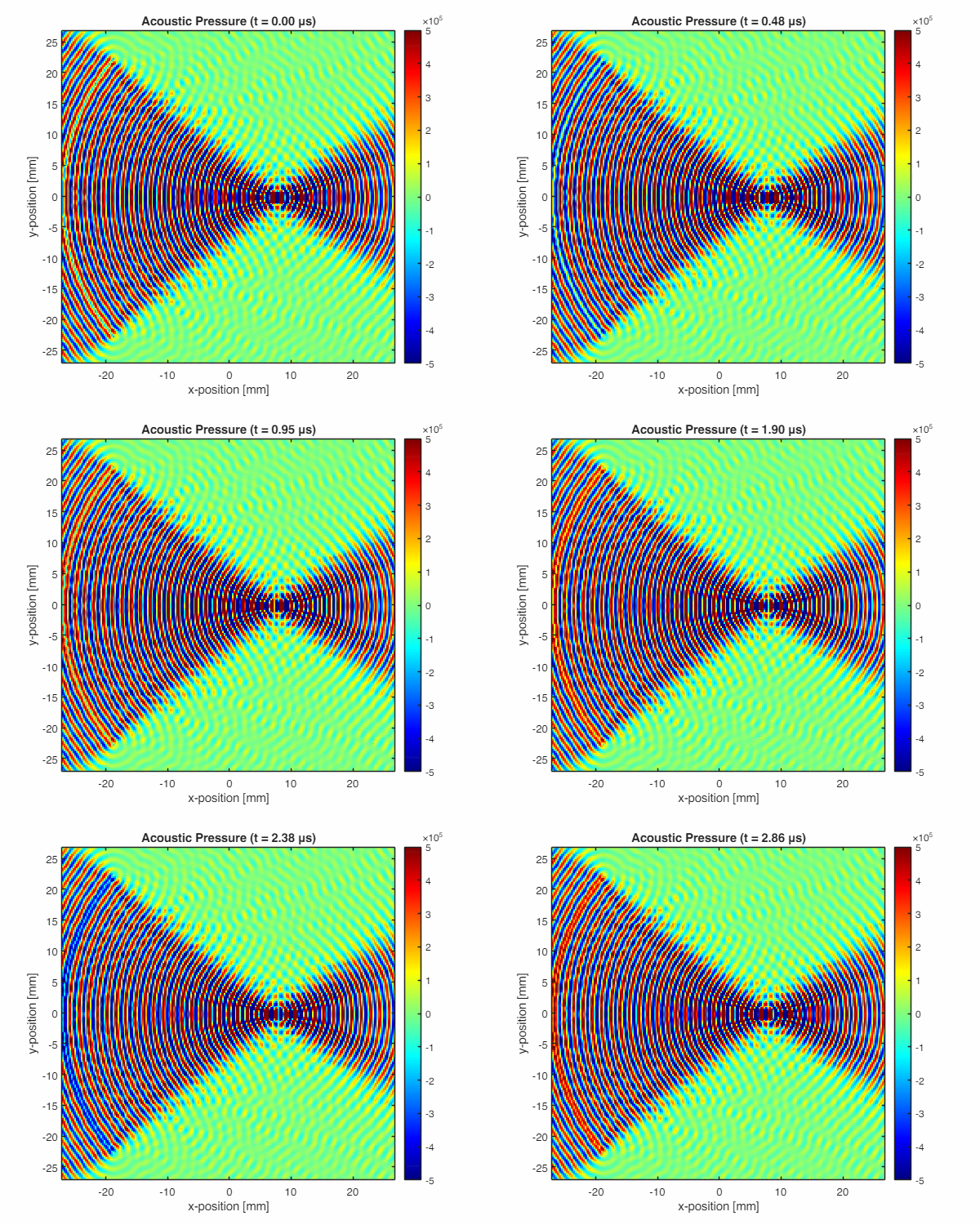
The acoustic wave animation shows the focused ultrasound field:
The following figure shows the complete simulation results:
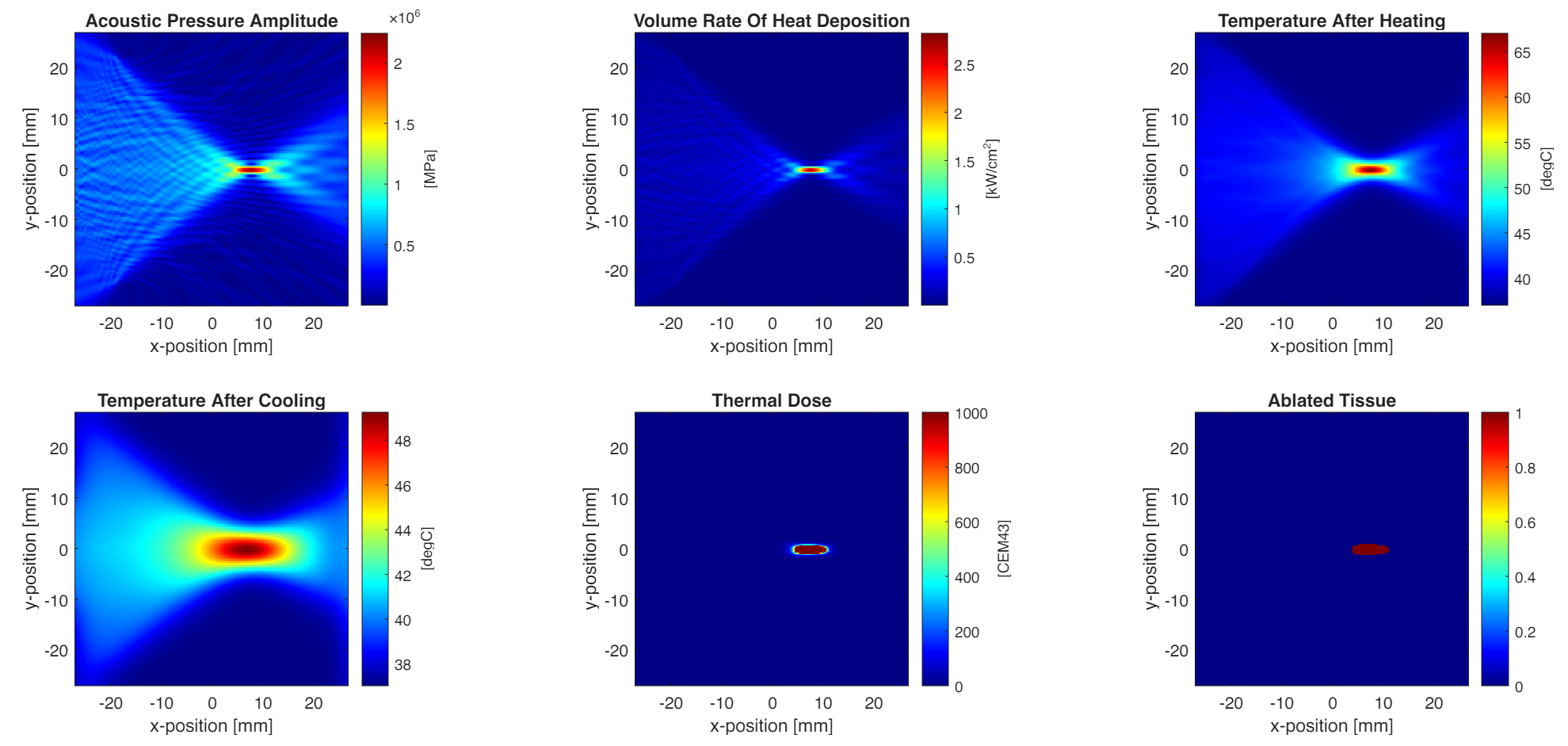
Key observations:
- Acoustic focusing: The pressure field shows clear focusing at the transducer’s geometric focal point
- Heat deposition: Concentrated at the focal region where acoustic intensity is highest
- Temperature rise: Maximum temperature exceeds 60°C at the focus during heating
- Thermal diffusion: Heat spreads and temperature decreases during cooling
- Thermal dose: Highest CEM43 values at the focal zone
- Ablation region: Tissue with CEM43 ≥ 240 min is considered ablated
COMSOL Implementation
COMSOL Multiphysics provides a graphical interface for setting up multi-physics simulations with acoustic-thermal coupling.
Create New Model
- Open COMSOL Multiphysics 6.4
- Select Model Wizard → 2D geometry
- Add physics:
- Acoustics → Pressure Acoustics, Frequency Domain
- Heat Transfer → Bioheat Transfer
- Mathematics → ODE and DAE Interfaces → Domain ODE
- Select study: Preset Studies → Frequency-Transient
Define Parameters
Go to Global Definitions → Parameters and add:
| Name | Expression | Description |
|---|---|---|
| Lx | 54 [mm] | Domain width |
| Ly | 54 [mm] | Domain height |
| c0 | 1510 [m/s] | Sound speed |
| rho0 | 1020 [kg/m^3] | Density |
| f0 | 1 [MHz] | Frequency |
| amp | 0.5 [MPa] | Source amplitude |
| diameter | 45 [mm] | Transducer diameter |
| radius | 35 [mm] | Focal radius |
| k_thermal | 0.5 [W/(m*K)] | Thermal conductivity |
| cp | 3600 [J/(kg*K)] | Specific heat |
| T0 | 37 [degC] | Initial temperature |
| on_time | 10 [s] | Heating duration |
| off_time | 20 [s] | Cooling duration |
| alpha_final | 0.75 * 0.115129 [1/cm] * (f0/1[MHz])^1.5 | Absorption coefficient* |
| *0.115129 ≈ ln(10)/20 converts dB to Np |
Build Geometry
- Right-click Geometry 1 → Rectangle
- Set size to 54 × 54 mm, centered at origin
- Right-click Geometry 1 → Parametric Curve
- Create transducer arc with expressions:
- x:
35*cos(s) - y:
35*sin(s)
- x:
- Parameter range:
π - asin(22.5/35)toπ + asin(22.5/35)(half-angle calculated from diameter/2 / radius) - Position offset:
(8, 0)mm (places arc vertex at left boundary)
- Create transducer arc with expressions:
- Click Build All
Define Materials
- Right-click Materials → Blank Material
- Name it “Tissue” and set:
- Sound speed:
c0 - Density:
rho0 - Thermal conductivity:
k_thermal - Heat capacity:
cp
- Sound speed:
- Assign to domain
Configure Physics
Pressure Acoustics (acpr)
- Click Pressure Acoustics, Frequency Domain
- Under Pressure Acoustics Model 1, set:
- Fluid model: Attenuation
- Attenuation coefficient:
alpha_final
- Right-click → Pressure → Apply to transducer arc boundaries
- Set Pressure:
amp
- Set Pressure:
- Right-click → Plane Wave Radiation → Apply to outer boundaries (absorbing BC)
Bioheat Transfer (ht)
- Right-click Bioheat Transfer → Heat Source
- Set General source:
acpr.Q_pw * rect1(t[1/s])- This uses the
rect1function to modulate the acoustic heat source in time (on for 0-10s, off for 10-30s)
- This uses the
- Set initial temperature:
T0
Domain ODE (dode)
- Configure the dependent variable as
cem43_sec - Set the source term:
- This calculates cumulative thermal dose in seconds
Create Rectangle Function
- Go to Component 1 → Definitions → Functions → Rectangle
- Set lower limit:
0, upper limit:10 - This creates the on/off control for heating
Create Mesh
- Right-click Mesh 1 → Free Triangular
- Set Maximum element size to
λ/6 ≈ 0.25 mm(wavelength λ = c₀/f₀ = 1.51 mm) - Click Build All
Configure Study
- Step 1: Frequency Domain
- Set Frequencies:
f0
- Set Frequencies:
- Step 2: Time Dependent
- Set Times:
range(0, 0.1, 30) - Under Study Extensions, select “Values of variables not solved for” → use solution from Frequency Domain step
- Set Times:
Run and Post-Process
- Click Compute
- Create Plot Groups:
- 2D Plot Group 1: Acoustic pressure amplitude
- 2D Plot Group 2: Heat deposition (
acpr.Q_pw) - 2D Plot Group 3: Temperature at t = 10 s
- 2D Plot Group 4: Temperature at t = 30 s
- 2D Plot Group 5: Thermal dose (
cem43_sec / 60) - 2D Plot Group 6: Ablated tissue (
cem43_sec / 60 >= 240)
COMSOL Results
The acoustic wave animation shows the COMSOL frequency-domain solution:
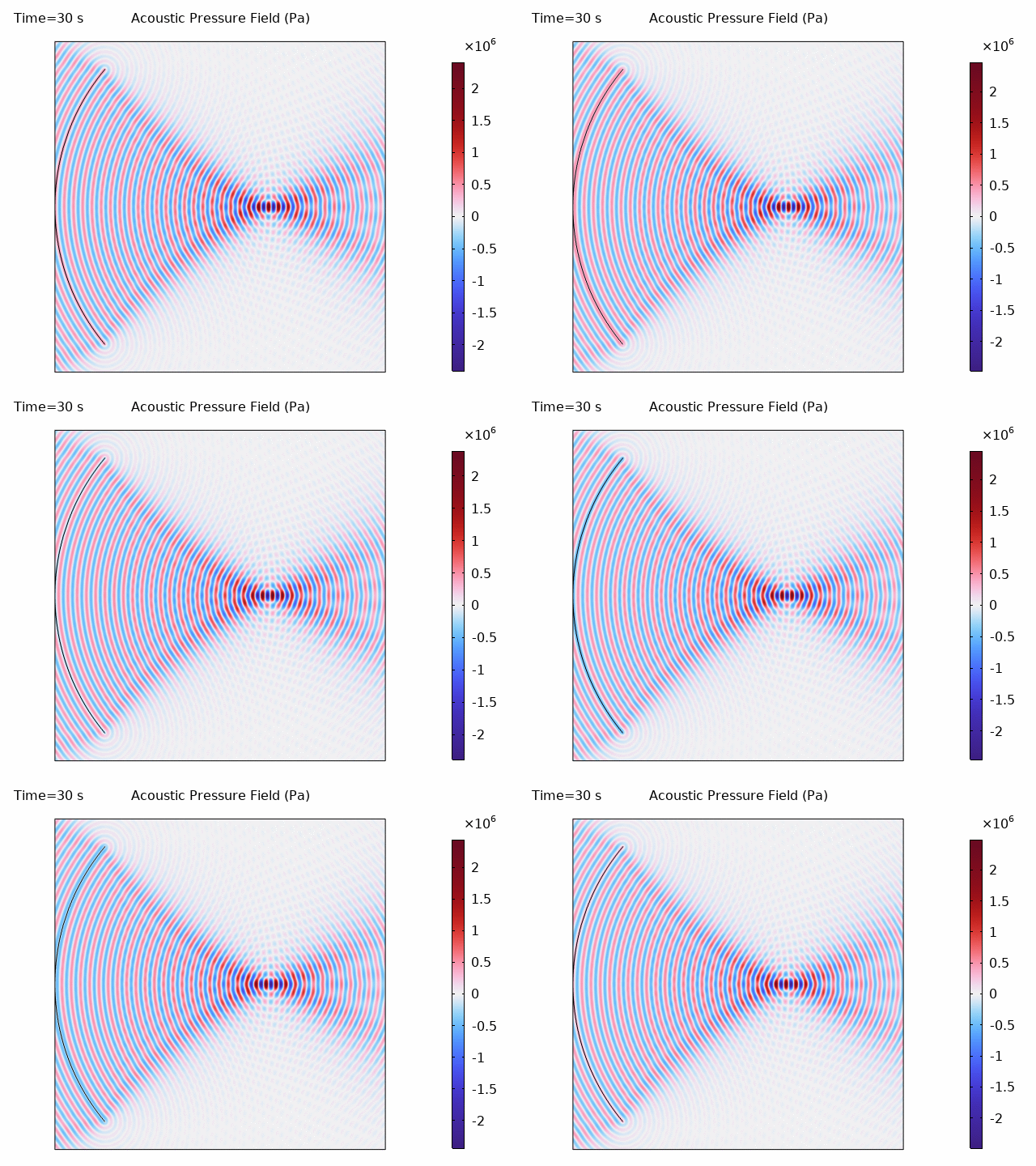
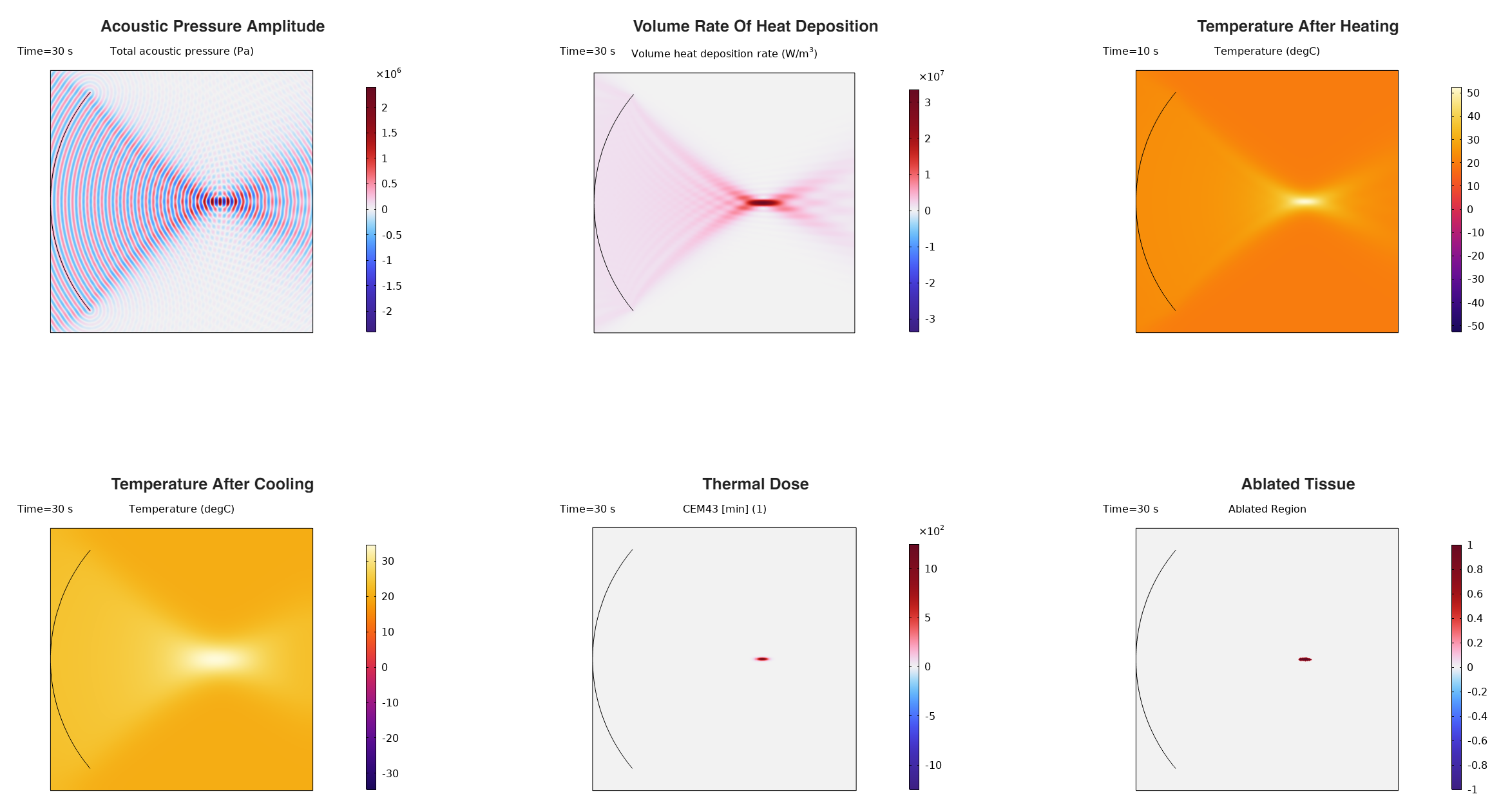
The COMSOL simulation produces results comparable to k-Wave:
Results Comparison
Visual Comparison
Both simulations show excellent agreement in all physical quantities:
| Quantity | k-Wave | COMSOL | Agreement |
|---|---|---|---|
| Focal pressure | ~2 MPa | ~2 MPa | ✓ |
| Heat deposition pattern | Focused at focal point | Focused at focal point | ✓ |
| Max temperature (heating) | ~65°C | ~65°C | ✓ |
| Max temperature (cooling) | ~48°C | ~48°C | ✓ |
| Ablation zone shape | Elliptical | Elliptical | ✓ |
Physical Interpretation
- Acoustic focusing: The 45 mm diameter transducer with 35 mm focal radius creates a tight focal spot at the domain center
- Temperature rise: The focal zone reaches temperatures well above 43°C, sufficient for thermal ablation
- Thermal diffusion: After heating stops, temperature decreases due to thermal conduction, but the ablation has already occurred
- Lesion formation: The ablated region (CEM43 ≥ 240) is smaller than the peak temperature region, as thermal dose accounts for both temperature and exposure time
Efficiency Comparison
Benchmark Results
| Parameter | k-Wave | COMSOL |
|---|---|---|
| Grid Points / Mesh Elements | 46,656 (216 × 216) | 127,182 domain + 1,476 boundary |
| Acoustic Time Steps | 1,062 | N/A (frequency domain) |
| Thermal Time Steps | 300 (0.1 s × 30 s) | 301 |
| Simulation Type | Time-domain + Diffusion | Frequency-domain + Transient |
| Acoustic Approach | k-space Pseudospectral | Finite Element |
| Thermal Approach | Finite Difference | Finite Element |
| Total Computation Time | ~15 s* | 93.56 s |
*Note: k-Wave timing estimated from acoustic + thermal simulation. Actual timing depends on hardware.
Analysis
- Mesh/Grid Density: COMSOL uses ~2.7× more elements than k-Wave grid points, as FEM typically requires finer meshes to achieve equivalent accuracy to pseudospectral methods.
- Acoustic Simulation: k-Wave runs 1,062 time steps to reach steady state, while COMSOL solves directly in frequency domain (single solve). Despite this, the FEM solve is computationally heavier.
- Thermal Simulation: Both methods use similar time stepping (0.1 s intervals for 30 s), but FEM assembly and solve overhead adds to COMSOL’s computation time.
- Overall Speedup: k-Wave is approximately 6× faster than COMSOL for this multi-physics simulation.
When to Use Each Tool
| Scenario | Recommended Tool |
|---|---|
| Large-scale acoustic simulations | k-Wave |
| Rapid prototyping and parameter studies | k-Wave |
| Complex geometries (CAD imports) | COMSOL |
| Multi-physics with structural mechanics | COMSOL |
| GUI-based workflow preference | COMSOL |
| Teaching and visualization | Either |
Conclusion
Both k-Wave and COMSOL successfully simulate focused ultrasound heating, producing results that agree well with each other. Key findings:
- Multi-physics coupling: Acoustic-thermal simulations require careful coupling of the acoustic pressure field to the thermal heat source
- Thermal dose: CEM43 provides a clinically relevant metric for predicting tissue ablation
- Complementary tools: k-Wave excels in acoustic simulation efficiency, while COMSOL provides integrated multi-physics capabilities
Clinical Relevance
This simulation approach is directly applicable to:
- HIFU therapy planning: Predicting lesion size and shape
- Treatment monitoring: Correlating temperature measurements with thermal dose
- Device design: Optimizing transducer geometry for specific clinical applications
References
- Treeby, B. E., & Cox, B. T. (2010). k-Wave: MATLAB toolbox for the simulation and reconstruction of photoacoustic wave fields. Journal of Biomedical Optics, 15(2), 021314.
- Pennes, H. H. (1948). Analysis of tissue and arterial blood temperatures in the resting human forearm. Journal of Applied Physiology, 1(2), 93-122.
- Sapareto, S. A., & Dewey, W. C. (1984). Thermal dose determination in cancer therapy. International Journal of Radiation Oncology, Biology, Physics, 10(6), 787-800.
- COMSOL Multiphysics Reference Manual, version 6.4.
- Duck, F. A. (1990). Physical Properties of Tissue. Academic Press.