Unlock the hidden potential of 'Dark Data'. Master Unsupervised Learning fundamentals, explore the 'Student vs. Explorer' analogy, and navigate the taxonomy of Clustering, Dimensionality Reduction, and Anomaly Detection.
Learning Objectives
After reading this post, you will be able to:
Understand the fundamental differences between supervised and unsupervised learning
Know the three major categories of unsupervised methods: clustering, dimensionality reduction, and anomaly detection
Identify appropriate use cases for unsupervised techniques
Preview the UML series roadmap and what’s coming next
Acronym Clarification: In the context of this series, UML stands for Unsupervised Machine Learning, not the Unified Modeling Language used in software engineering. We use this abundance of caution because, ironically, “ambiguity” is a core theme of unsupervised learning!
Theory
What is Unsupervised Learning?
Imagine you are an explorer landing on an alien planet. You encounter strange plants and animals you’ve never seen before. There is no guidebook, no teacher, and no labels telling you “this is a tree” or “that is a wolf.”
What do you do?
You start observing. You notice that some creatures have wings and fly (Group A), while others have fins and swim (Group B). You notice that some plants are tall with wood (structure), while others are small and green. You are learning by observation. This is the essence of Unsupervised Learning.
In the Supervised Learning series, every training sample had a label — a “correct answer” provided by a “teacher.” But in the real world, most data is like that alien planet: vast, complex, and completely unlabeled. This is often called Dark Data.
Unsupervised learning discovers hidden patterns, structures, and relationships in this “dark” data without any labels. Instead of learning input-output mappings (like a student preparing for a test), these algorithms find the underlying structure in the data itself (like a scientist discovering natural laws).
Supervised vs Unsupervised: A Comparison
graph TD
subgraph Supervised [🎓 Supervised Learning: The Student]
direction TB
S_Data[("Input Data + Correct Answers\n(Images + Labels)")]
S_Algo["🧠 Model (Student)"]
S_Pred["📝 Prediction"]
S_Teacher["👨🏫 Teacher (Loss Function)"]
S_Data --> S_Algo
S_Algo --> S_Pred
S_Pred --> S_Teacher
S_Data -.->|"Correct Answer"| S_Teacher
S_Teacher --"Feedback / Correction"--> S_Algo
end
subgraph Unsupervised [🔍 Unsupervised Learning: The Explorer]
direction TB
U_Data[("Input Data Only\n(Raw Observations)")]
U_Algo["🧠 Model (Explorer)"]
U_Process{{"Finding Similarities"}}
U_Structure["📐 Hidden Structure\n(Clusters / Rules)"]
U_Data --> U_Algo
U_Algo --> U_Process
U_Process --> U_Structure
end
style S_Teacher fill:#ffccbc,stroke:#d35400,stroke-width:2px
style S_Algo fill:#e1f5fe
style U_Algo fill:#fff9c4
style U_Process fill:#e1bee7
Aspect
Unsupervised Learning
Supervised Learning
Data
Unlabeled (input only)
Labeled (input + output pairs)
Goal
Discover patterns/structure in data
Predict labels for new data
Evaluation
Subjective; harder to evaluate
Clear metrics (accuracy, MSE)
Analogy
Learning by Exploration: You figure out the rules yourself.
Learning with a Teacher: The teacher corrects your mistakes.
Examples
Clustering, Dimensionality Reduction
Classification, Regression
Real-world insight: Labeling data is expensive, slow, and human-intensive. Unsupervised learning unlocks the potential of the remaining 95%+ of your data that sits unused.
The Explorer’s Toolkit
Just as an explorer uses different tools for different terrains (maps, compasses, drills), we use three main types of unsupervised learning to navigate unknown data:
System monitoring (server failures, network intrusions)
Quality control (defective products)
Medical diagnosis (rare diseases)
When to Use Unsupervised Learning
graph LR
A[Your Problem] --> B{Have labels?}
B -->|Yes| C[Supervised Learning]
B -->|No| D{Goal?}
D -->|Find groups| E["Clustering"]
D -->|Reduce dimensions| F["Dimensionality Reduction"]
D -->|Find outliers| G["Anomaly Detection"]
style E fill:#c8e6c9
style F fill:#fff9c4
style G fill:#ffcdd2
Pro tip: Unsupervised learning is often used as a preprocessing step for supervised learning:
Cluster data to create pseudo-labels
Reduce dimensions before training classifiers
Detect and remove anomalies from training data
Real-World Applications
Domain
Application
Method
E-commerce
Customer segmentation
K-Means, GMM
Finance
Fraud detection
Isolation Forest
Healthcare
Disease subtyping
Hierarchical Clustering
NLP
Topic modeling
LDA, Clustering
Computer Vision
Image compression
PCA
Bioinformatics
Gene clustering
DBSCAN
Recommendation
User behavior analysis
t-SNE + Clustering
Code Practice
Let’s put on our boots. In this section, we will take a raw, unlabeled dataset (Dark Data) and act as the explorer. We’ll attempt to rediscover hidden structure without any guide to help us.
Loading Unlabeled Data
In supervised learning, we always loaded data with labels. Now, let’s see what working with unlabeled data looks like:
importnumpyasnpimportmatplotlib.pyplotaspltfromsklearn.datasetsimportload_iris# Load the Iris datasetiris=load_iris()X=iris.data# Features only (sepal/petal lengths/widths)# ⚠️ CRITICAL: In unsupervised learning, we DO NOT use the target (y labels)# We pretend they don't exist and let the data speak for itself.# y = iris.target <-- We ignore this!feature_names=iris.feature_namesprint("="*50)print("UNLABELED DATA EXPLORATION")print("="*50)print(f"\n📊 Dataset shape: {X.shape}")print(f"📐 Features: {feature_names}")print(f"\n🔢 Sample data (first 5 rows):")print(X[:5])
Notice there are no labels! In supervised learning, we’d have y = iris.target with values like 0, 1, 2 for the three species. Here, we pretend we don’t know those labels — can the algorithm discover the groups on its own?
Visualizing Unlabeled Data
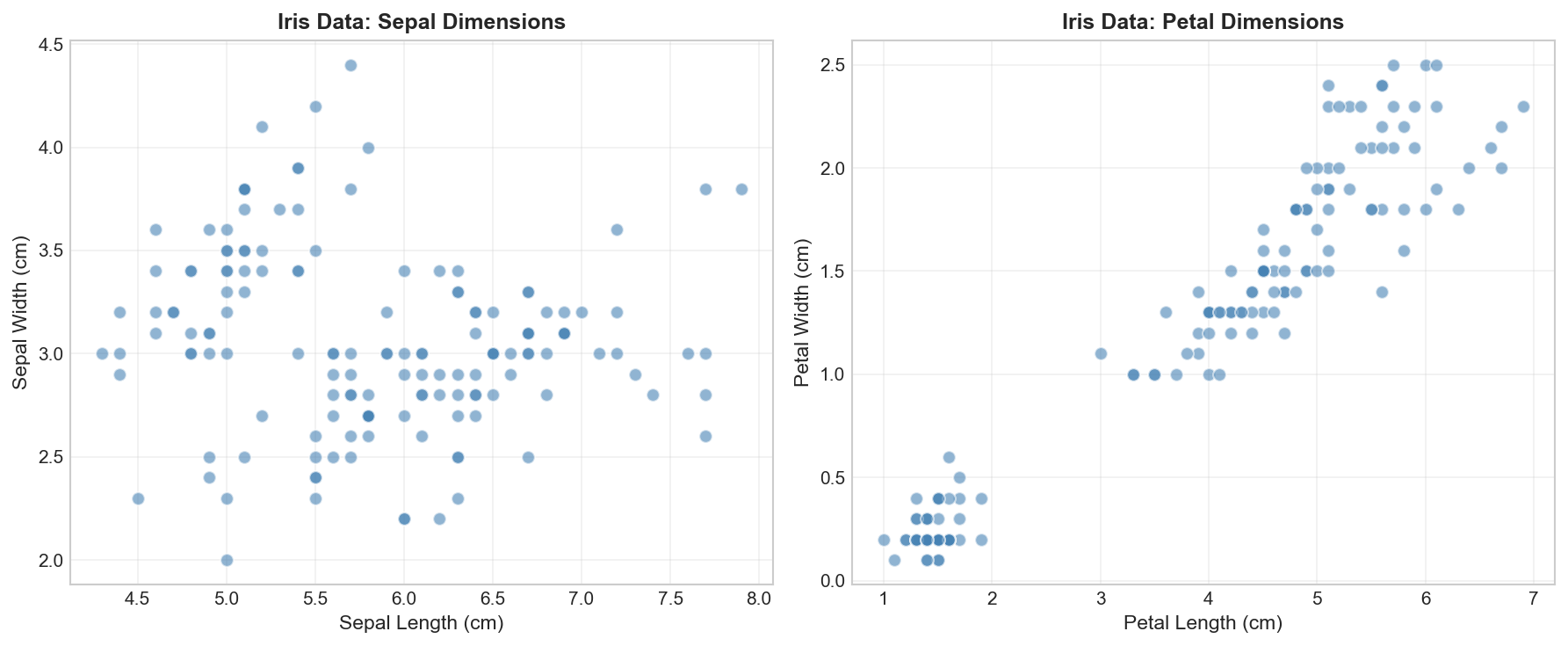
Before applying any algorithm, let’s visualize our data to see if natural groupings exist:
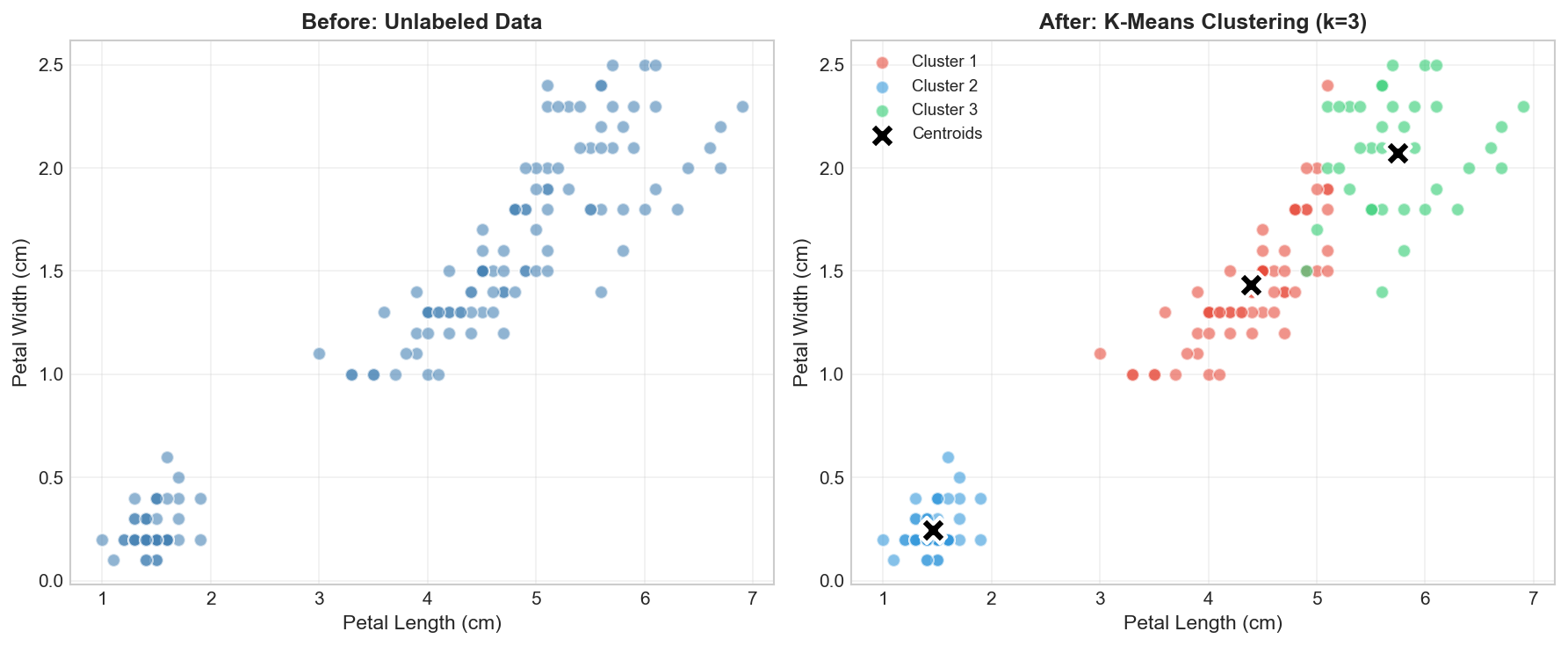
fromsklearn.clusterimportKMeans# Apply K-Means clustering# n_clusters=3: We (the humans) know there are 3 species, but in real life, # you might need to use the 'Elbow Method' to find this number.# random_state=42: Ensures reproducible results.# n_init=10: Run the algorithm 10 times with different starting points # to avoid getting stuck in bad local situations.kmeans=KMeans(n_clusters=3,random_state=42,n_init=10)# The algorithm learns the structure (fit) and assigns labels (predict)clusters=kmeans.fit_predict(X)# Visualize the clustering resultfig,axes=plt.subplots(1,2,figsize=(12,5))# Original data (no labels)axes[0].scatter(X[:,2],X[:,3],c='steelblue',alpha=0.6,s=50)axes[0].set_xlabel('Petal Length (cm)')axes[0].set_ylabel('Petal Width (cm)')axes[0].set_title('Before: Unlabeled Data')axes[0].grid(True,alpha=0.3)# Clustered datacolors=['#e74c3c','#3498db','#2ecc71']foriinrange(3):mask=clusters==iaxes[1].scatter(X[mask,2],X[mask,3],c=colors[i],alpha=0.6,s=50,label=f'Cluster {i+1}')# Plot cluster centerscenters=kmeans.cluster_centers_axes[1].scatter(centers[:,2],centers[:,3],c='black',marker='X',s=200,edgecolors='white',linewidths=2,label='Centroids')axes[1].set_xlabel('Petal Length (cm)')axes[1].set_ylabel('Petal Width (cm)')axes[1].set_title('After: K-Means Clustering (k=3)')axes[1].legend()axes[1].grid(True,alpha=0.3)plt.tight_layout()plt.savefig('assets/kmeans_preview.png',dpi=150)plt.show()print(f"\n📊 Clustering Results:")print(f" Cluster sizes: {np.bincount(clusters)}")
K-Means clustering discovers 3 natural groups in the Iris data — without ever seeing the true species labels!
Amazing! K-Means found 3 clusters that closely match the true Iris species — all without seeing any labels! The algorithm discovered the natural structure in the data purely from the feature values.
Comparing with True Labels (Cheating a Little)
Let’s peek at how well our unsupervised clustering matches the true labels:
fromsklearn.metricsimportadjusted_rand_score,normalized_mutual_info_score# True labels (we pretend we didn't have these!)y_true=iris.target# Evaluate clustering quality# Adjusted Rand Index (ARI): Measures similarity between true and predicted labels.# 0.0 = Random labeling# 1.0 = Perfect matchari=adjusted_rand_score(y_true,clusters)# Normalized Mutual Information (NMI): Just another way to measure agreement.nmi=normalized_mutual_info_score(y_true,clusters)print("="*50)print("CLUSTERING EVALUATION (using hidden labels)")print("="*50)print(f"\n📊 Adjusted Rand Index: {ari:.4f}")print(f"📊 Normalized Mutual Info: {nmi:.4f}")print(f"\n💡 Note: In real unsupervised learning, you wouldn't have 'y_true'!")print(f" You would rely on business logic or internal metrics like Silhouette Score.")
==================================================
CLUSTERING EVALUATION (using hidden labels)
==================================================

📊 Adjusted Rand Index: 0.7302
📊 Normalized Mutual Info: 0.7582

💡 Note: In real unsupervised learning, you wouldn't have 'y_true'!
   You would rely on business logic or internal metrics like Silhouette Score.
Evaluation note: In real unsupervised learning, you typically don’t have true labels to compare against. These metrics are used here purely for demonstration. We’ll discuss proper evaluation techniques for unsupervised learning in later posts.
Deep Dive
Frequently Asked Questions
Q1: How do you evaluate unsupervised learning without labels?
This is the hardest part of being an explorer: you don’t have an answer key. Instead of checking against “correct” labels, we measure success by the utility of the discovery. We rely on a combination of mathematical heuristics and practical validation:
Approach
Method
Description
Internal metrics
Silhouette Score
Measures how similar an object is to its own cluster (cohesion) compared to other clusters (separation).
Calinski-Harabasz
Ratio of between-cluster dispersion to within-cluster dispersion.
External metrics
Adjusted Rand Index
Only possible if you have a small subset of labeled data for validation.
Visual inspection
t-SNE / PCA
Projecting data to 2D/3D to visually verify if the clusters “look” separated.
Business Validation
A/B Testing
The gold standard. For example, if you cluster customers, send different marketing campaigns to each cluster and see if conversion rates improve.
The “So What?” Test: The best evaluation metric for unsupervised learning is often utility. Does the new structure help solve the business problem? If a clustering model groups customers in a way that allows the marketing team to craft better campaigns, it is a good model, regardless of its Silhouette Score.
Q2: When should I choose unsupervised over supervised learning?
Use unsupervised learning when:
✅ You don’t have labeled data
✅ Labeling is too expensive or impossible
✅ You want to explore data structure before building models
✅ You’re looking for anomalies or unusual patterns
✅ You need to reduce dimensionality for visualization or efficiency
Q3: Can unsupervised learning create labels for supervised learning?
Yes! This is called semi-supervised learning or self-training:
graph LR
A["Unlabeled Data"] --> B["Clustering"]
B --> C["Pseudo-labels"]
C --> D["Train Classifier"]
D --> E["Final Model"]
style C fill:#fff9c4
This approach can leverage large amounts of unlabeled data to improve models when labeled data is scarce.
Q4: What’s the difference between clustering and classification?
Aspect
Clustering
Classification
Labels
No predefined labels
Known classes
Goal
Discover groups
Assign to known groups
Evaluation
Internal metrics
Accuracy, F1, etc.
Learning type
Unsupervised
Supervised
The Challenge of Unsupervised Learning
Key insight: Unsupervised learning has no single “correct answer.” Different algorithms may produce very different results on the same data. Choosing the right number of clusters or the right algorithm requires domain knowledge and experimentation.