A tutorial on using the Fast Fourier Transform (FFT) in Julia to analyze the frequency spectrum of blue whale vocalizations and tiger roars.
Audio Comparison
Animal
Frequency Range
Loudness
Characteristics
Blue Whale
15-25 Hz
~180 dB
Infrasonic, long-distance
Tiger
18-800 Hz
~114 dB
Low-frequency roar
Blue Whale Audio
Human hearing typically ranges from about $20$ to $20{,}000$ Hz. Blue whales, however, communicate at much lower frequencies, roughly between $15$ and $25$ Hz. These sounds are infrasonic—often below the threshold of human hearing—but they are also incredibly intense, reaching up to about $180$ decibels. A higher decibel level corresponds to a larger amplitude, meaning the sound waves carry a significant amount of energy.
To better understand the structure of these calls, we can analyze their frequency content using the Fourier transform. In this post, we will use Julia’s FFT (Fast Fourier Transform) tools to inspect a recorded blue whale vocalization.
The audio file bluewhale.wav contains a Pacific blue whale call recorded by underwater microphones off the coast of California. The data comes from the library of animal vocalizations maintained by the
Cornell University Bioacoustics Research Program
.
Because blue whale calls are so low in frequency, they are barely audible to humans in their original form. To make the sound perceptible, the time axis in this recording has been compressed by a factor of $10$. Compressing time by $10$ raises all frequencies by the same factor, effectively shifting the call into a more audible range. When we analyze the data, we must account for this speed-up to recover the true frequencies of the whale.
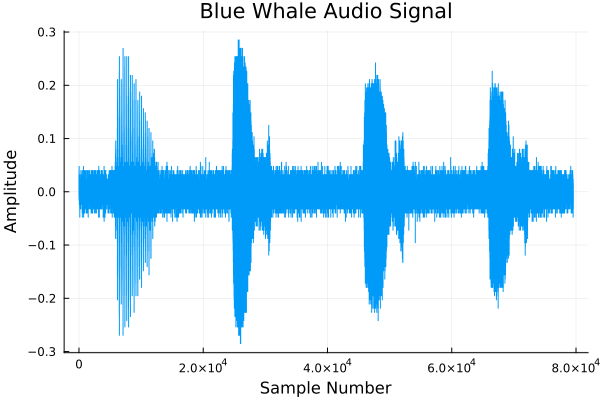
We start by loading and plotting the raw audio signal:
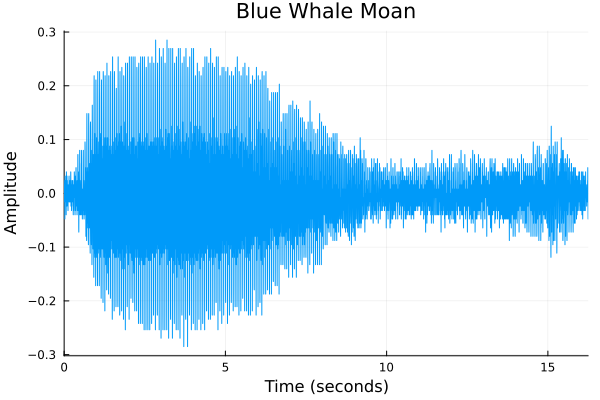
In this recording, the first sound is a “trill” followed by three “moans”. To keep the analysis focused and clear, we will concentrate on a single moan. We first convert the audio to a 1D vector, then extract a segment that approximately corresponds to the first moan. We also correct the time axis by the factor-of-10 speed-up, so that the horizontal axis reflects the whale’s actual time scale.
# Convert 2D array to 1D vectoraudio_data=vec(audio_data)# Extract moan segment (indices chosen from visual inspection)moan=audio_data[24500:31000]# Correct for time compression by factor of 10time_axis=10*range(0,(length(moan)-1)/sample_rate,length=length(moan))# Plot moan segmentplot(time_axis,moan,xlabel="Time (seconds)",ylabel="Amplitude",xlim=(0,time_axis[end]),legend=false,title="Blue Whale Moan")
To reveal the frequency components of this moan, we apply the discrete Fourier transform using fft. In many FFT-based applications, it is beneficial to use an input length that is a power of two. This often speeds up the computation, especially when the original sample length has large prime factors.
We therefore choose a padded length fft_length (the next power of two greater than the original moan length), zero-pad the signal to this length, and then compute the FFT. Because the audio was sped up by a factor of $10$, we divide the resulting frequency axis by $10$ to recover the original frequencies.
# FFT analysisoriginal_length=length(moan)fft_length=nextpow(2,original_length)# Pad to power of 2 for better performance# Zero-pad the signal to fft_lengthmoan_padded=vcat(moan,zeros(fft_length-original_length))# Compute FFTfft_result=fft(moan_padded)# Frequency axis (corrected for 10× time compression)frequency_axis=(0:fft_length-1)*(sample_rate/fft_length)/10# Power spectrum (proportional to energy)power_spectrum=abs.(fft_result).^2/fft_length# Plot power spectrum (only positive frequencies)plot(frequency_axis[1:fft_length÷2],power_spectrum[1:fft_length÷2],xlabel="Frequency (Hz)",ylabel="Power",legend=false,title="FFT Power Spectrum of Blue Whale Moan")
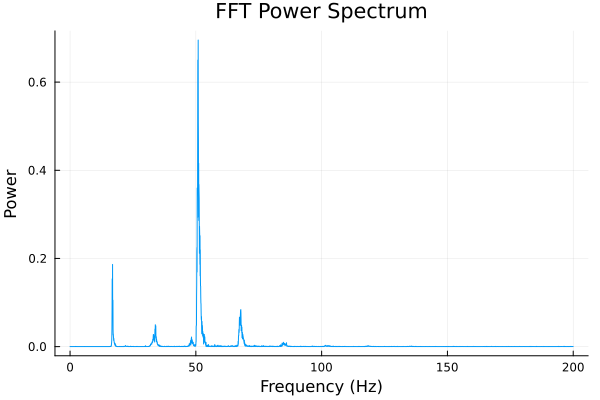
The resulting power spectrum shows that the moan has a fundamental frequency of about $17$ Hz, along with a series of harmonics. The second harmonic is particularly pronounced. The first major peak represents the whale’s fundamental call, while subsequent peaks correspond to harmonics, some of which may be influenced by low-frequency sonar or other equipment in the ocean environment.
Because power is proportional to the square of the amplitude, higher peaks indicate greater energy at those frequencies. The prominence of the harmonic peaks suggests that a significant amount of energy is present not only in the fundamental whale vocalization, but also in these additional frequency components.
Tiger Audio
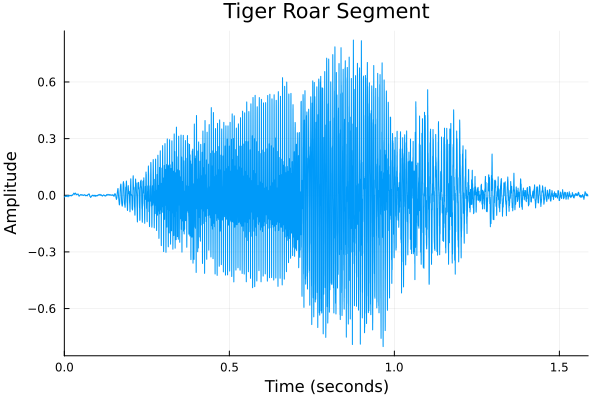
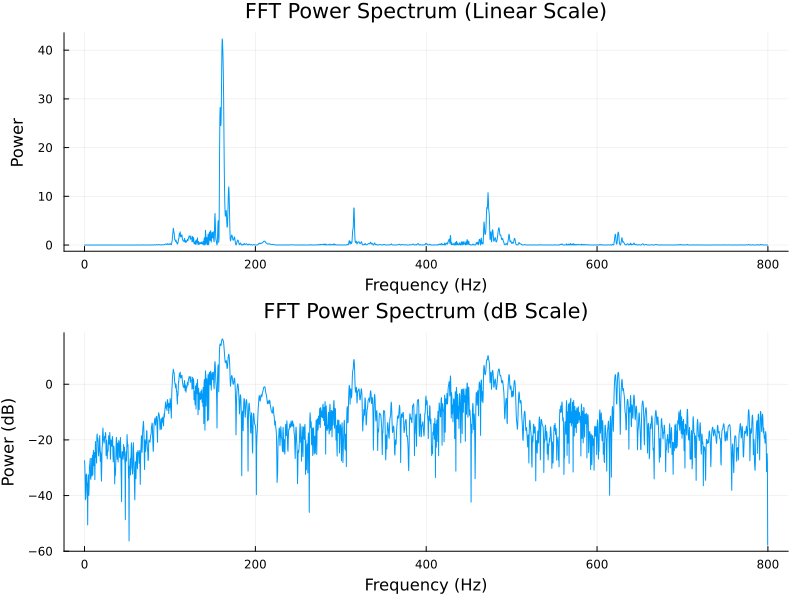
While blue whales communicate in the infrasonic range, terrestrial predators like tigers also utilize low-frequency sounds to assert dominance and communicate over long distances. A tiger’s roar is rich in low-frequency energy, which allows the sound to penetrate through dense forests. In this section, we apply the same FFT techniques to analyze a recording of a tiger’s roar, visualizing its spectral characteristics to see how its acoustic signature compares to the deep ocean calls of the blue whale.
usingWAVusingPlotsusingFFTW## Load Audio Fileaudio_file=joinpath(@__DIR__,"tiger.wav")audio_data,sample_rate=wavread(audio_file)## Plot Raw Audio Signalplot(audio_data,xlabel="Sample Number",ylabel="Amplitude",legend=false,title="Tiger Audio Signal")## Preprocess Audio Data# Convert 2D array to 1D vector (WAV files may have multiple channels)audio_data=vec(audio_data)# Extract segment of interest (tiger roar)segment_start=20000segment_end=90000roar_segment=audio_data[segment_start:segment_end]# Create time axis for plottingtime_axis=range(0,(length(roar_segment)-1)/sample_rate,length=length(roar_segment))## Plot Roar Segmentplot(time_axis,roar_segment,xlabel="Time (seconds)",ylabel="Amplitude",xlim=(0,time_axis[end]),legend=false,title="Tiger Roar Segment")## FFT Analysis# Pad signal to next power of 2 for better FFT performanceoriginal_length=length(roar_segment)fft_length=nextpow(2,original_length)# Zero-pad the signal and compute FFTroar_padded=vcat(roar_segment,zeros(fft_length-original_length))fft_result=fft(roar_padded)# Calculate frequency axis (Hz) and power spectrumfrequency_axis=(0:fft_length-1)*(sample_rate/fft_length)power_spectrum=abs.(fft_result).^2/fft_length## Plot Power Spectrum# Tiger roars are typically in low frequency range (< 1000 Hz)max_display_freq=800# Hzfreq_mask=frequency_axis.<=max_display_freq# Linear scale plotp1=plot(frequency_axis[freq_mask],power_spectrum[freq_mask],xlabel="Frequency (Hz)",ylabel="Power",legend=false,title="FFT Power Spectrum (Linear Scale)")# dB scale plot for better dynamic range visualizationpower_db=10*log10.(power_spectrum.+1e-10)# Add small value to avoid log(0)p2=plot(frequency_axis[freq_mask],power_db[freq_mask],xlabel="Frequency (Hz)",ylabel="Power (dB)",legend=false,title="FFT Power Spectrum (dB Scale)")# Display both plotsplot(p1,p2,layout=(2,1),size=(800,600))