2D Fourier Transform for Image Recognition and Processing in Julia
Quick Reference: FFT Spectrum Components
| Component | Contains | Reconstruction |
|---|---|---|
| Full Spectrum | Magnitude + Phase | Perfect original image |
| Magnitude Only | Intensity info | Blurry, no structure |
| Phase Only | Edge/structure info | Outlines preserved |
In previous exploration of the Fourier Transform, we focused on processing one-dimensional arrays or vectors, such as the analysis of blue whale vocalizations. Now, we extend this concept to the 2D Fourier Transform to understand the frequency characteristics inherent in images. In the field of Artificial Intelligence, image recognition—the ability to distinguish between a cat, a dog, or a car—relies on identifying distinct features. Just as humans recognize objects based on specific traits, we must enable computers to extract and analyze these features.
Consider a classic application like recognizing digits in the MNIST dataset. The process typically involves passing data through convolutional layers, activation layers, pooling layers, and affine transformation layers, finally resulting in a Softmax output that provides classification probabilities. In simple terms, a convolution kernel (a matrix) acts as a sliding window, performing convolution operations across the image. These operations identify low-level features like textures and edges. By stacking these layers with activation and pooling functions, the network extracts increasingly high-level, abstract features.
When we talk about image features, we are essentially dealing with frequencies—specifically, the rate of change in pixel brightness. In the context of AI and deep learning, this is often referred to as the gradient. By feeding a vast number of images into a model and utilizing gradient descent to update parameters like weights and biases, we fit the model to maximize recognition accuracy. Once trained, we test the model with new images to evaluate its generalization performance.
Just as listening to music happens in the time domain, viewing images happens in the spatial domain. While this is intuitive for humans, processing raw spatial data can be computationally complex for certain tasks. The Fourier Transform allows us to convert this data from the spatial domain into the frequency domain, simplifying the analysis of periodic patterns and variations. For this demonstration, we will convert our input image to grayscale.
Since our input is a 3D color image (RGB), we first convert it to grayscale. This reduces it to a single channel, representing intensity values, which simplifies the Fourier analysis:

| |
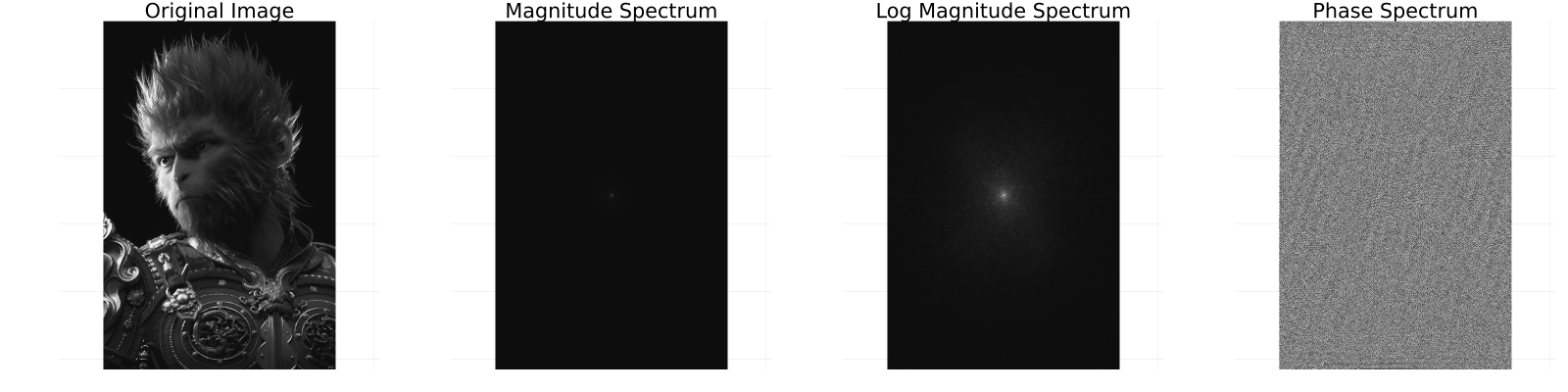
As observed, the original image is visually intuitive to us. However, the frequency components and phase angles in the frequency domain—while abstract and less intuitive to the human eye—contain structured data that is often easier for computers to process and analyze.
Next, we perform the 2D Inverse Fourier Transform. We will attempt to reconstruct the image using different components: the full spectrum, the magnitude spectrum alone, and the phase spectrum alone.
| |
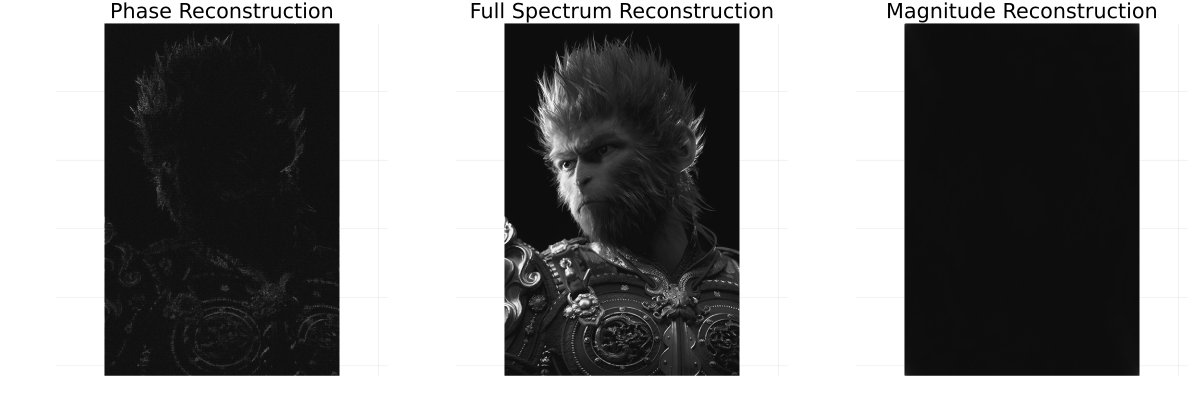
The results are illuminating: the full spectrum perfectly reconstructs the original image. Interestingly, the phase spectrum alone preserves the structural outlines and edges of the image, while the magnitude spectrum primarily contains intensity information but lacks structure.
To understand the conversion of phase angles to complex numbers in the code (exp.(1im .* phase)), we can look to Euler’s formula. For instance, $e^{(i\pi)} = -1$ represents a $180$-degree rotation on the complex plane (landing on $-1$ on the real axis). Similarly, a $45$-degree rotation is $e^{(i\pi/4)} = \cos(\pi/4) + i\sin(\pi/4) \approx 0.707 + 0.707i$.